
8 Best Digital Signature Software in 2026, Compared
Compare the 8 best digital signature software options on price, free plans and envelope limits, with every price checked on November 12, 2026.
 Shamim Mia, Founder, SerpAstraLast verified November 12, 202612 min read
We compare pricing pages, documentation and public reviews. We never accept payment for rankings.

Key takeaways
- DocuSign leads for most small businesses at $15 a month, with PandaDoc from $35 a seat a month and Dropbox Sign from $20 a month.
- The single most important buying factor is the sending limit: envelopes, signature requests and documents are three different meters, and the cap decides the real cost.
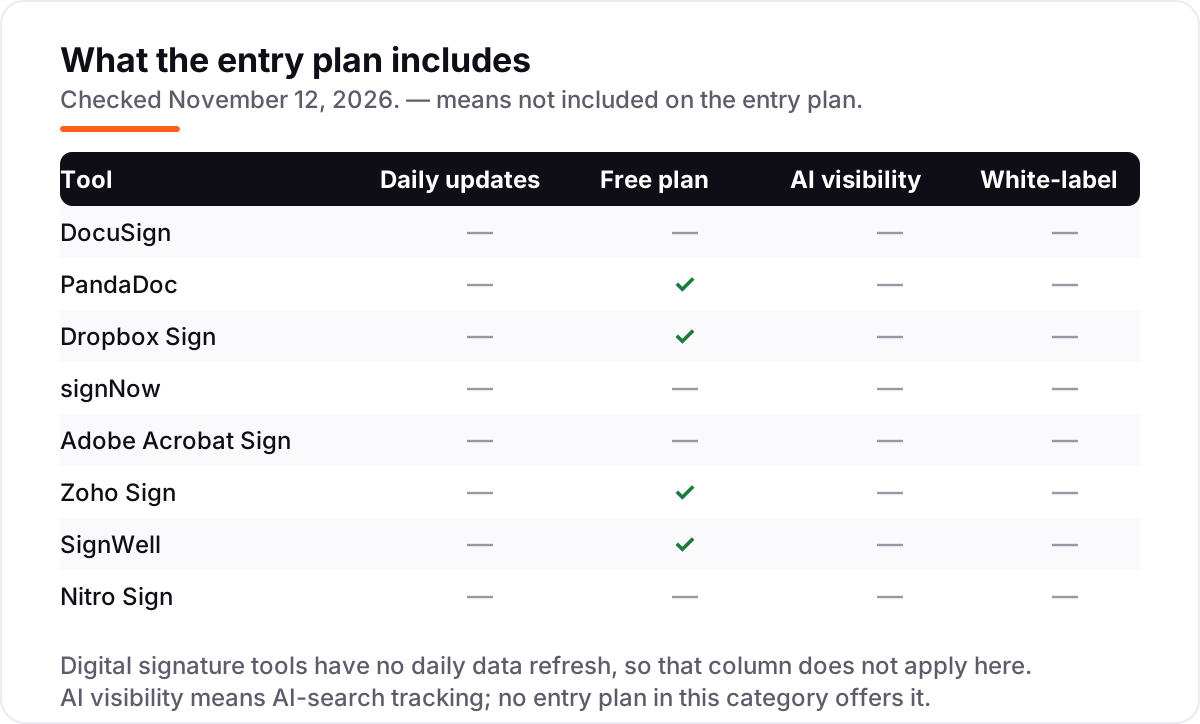
- Four of the 8 tools have a free plan — PandaDoc, Dropbox Sign, Zoho Sign and SignWell — but the caps run from 3 to 5 documents a month.
- Every price below was verified on the vendor's own pricing page on November 12, 2026. Ratings are G2, with review counts shown; signNow shows no rating because its G2 page could not be verified fresh.
On this page
Quick comparison
| Tool | Best for | Starting price | Free plan |
|---|---|---|---|
| DocuSign | Small businesses and freelancers who need the signature brand every counterparty already accepts | $15/mo | No (30-day trial) |
| PandaDoc | Sales teams that build proposals and contracts and want signing in the same document | $35/seat/mo | Yes (5 docs/mo) |
| Dropbox Sign | Solo operators and small teams already in Dropbox who want unlimited signature requests | $20/mo | Yes (3 requests/mo) |
| signNow | Budget teams that need many users on one low flat price | $20/mo | No (7-day trial) |
| Adobe Acrobat Sign | Teams that already live in PDFs and want signing inside Acrobat | $24.99/mo | No (7-day trial) |
| Zoho Sign | Small businesses already in Zoho that want the cheapest per-user signing | $12/user/mo | Yes (5 docs/mo) |
| SignWell | Solo senders who want unlimited documents at the lowest flat price | $12/mo | Yes (3 docs/mo) |
| Nitro Sign | Teams that want predictable pricing by completed envelope, not by seat count | $10/user/mo (annual) | No (trial only) |
Make one of these tools?
We re-check this list every quarter. Send a correction, request a review, or ask about a clearly labeled sponsored spot.
Request a listingThe best digital signature software

DocuSign
Best for: Small businesses and freelancers who need the signature brand every counterparty already accepts
DocuSign is the default signature in this list, and that is its real advantage: when a client, bank or landlord sees a DocuSign envelope, nobody asks what it is or whether it counts. The Personal plan costs $15 a month billed monthly, or $10 billed annually, for one user sending up to five envelopes a month, with reusable templates and document storage included.
The catch is the envelope meter. Standard costs $45 per user a month billed monthly, or $25 billed annually, and the annual plan caps each user at 100 envelopes a year — about eight a month. A team that sends more than that pays per extra envelope or moves to a higher tier. Buy DocuSign when acceptance matters most; buy a cheaper tool when volume matters more.
What we like
- The most widely accepted e-signature brand — counterparties rarely question a DocuSign envelope
- 1,000-plus integrations, including Salesforce, Google Workspace and Microsoft 365
- Reusable templates, reminders and a full audit trail on every plan, including Personal
Watch out for
- Envelope caps bite fast: Personal allows 5 a month, Standard 100 per user a year on annual billing
- The cheapest plan is single-user only, so a team starts at Standard ($25/user/month billed annually)
- SMS delivery and identity verification are charged per use on top of the subscription

PandaDoc
Best for: Sales teams that build proposals and contracts and want signing in the same document
PandaDoc is a document builder with signing attached, which is why sales teams like it: you write the proposal, add the price table and collect the signature in the same file, instead of building the document somewhere else and uploading it to sign. The Starter plan costs $35 a seat a month billed monthly, or $19 billed annually, with unlimited documents and e-signatures.
The free plan is the most generous here: five documents a month with unlimited seats, so a whole small team can send the occasional contract for $0. The limits to watch are templates — five on Starter — and the add-ons: bulk send, web forms and API calls can need usage credits that the pricing page never prices. Pick PandaDoc when you sell with documents; pick a pure signer when you only need signatures.
What we like
- Builds the document and collects the signature in one place, with pricing tables and payments
- Free plan covers a whole team: 5 documents a month with unlimited seats
- Unlimited documents and e-signatures on every paid plan, with document analytics
Watch out for
- Only 5 templates on Starter; unlimited templates need Business at $49/seat/month billed annually
- Bulk send, web forms and API calls can require usage credits the pricing page does not price
- Custom branding and CRM integrations wait for Business, not Starter

Dropbox Sign
Best for: Solo operators and small teams already in Dropbox who want unlimited signature requests
Dropbox Sign is the simplest tool in this list: upload a document, add signature fields, send it, and the signer needs no account and pays nothing. The Essentials plan costs $20 a month billed monthly, or $15 billed annually, for one user with unlimited signature requests — no envelope meter at all — plus five templates and an audit trail.
The free plan covers three signature requests a month with unlimited self-signing, which is enough to test it on real contracts. The step up is Standard at $30 per user a month billed monthly, or $25 billed annually, which needs at least two users and adds branding, bulk send and in-person signing. Pick Dropbox Sign when you want signing with no counting; pick signNow when the whole team needs to send.
What we like
- Unlimited signature requests on every paid plan — no envelope counting
- Free plan with 3 requests a month plus unlimited self-signing
- Signers need no account and pay nothing; tight fit with Dropbox storage
Watch out for
- Essentials is single-user only; a second sender means Standard at $25/user/month billed annually
- No custom branding, bulk send or in-person signing on Essentials
- First-year promotional prices ($10.05/month) rise to the regular rate on renewal

signNow wins on team price because it charges per account, not per seat: the Business plan costs $20 a month billed monthly, or $8 billed annually, and the whole team signs on that one price with unlimited users and unlimited templates. For a five-person team that is $96 a year, against $1,500 for DocuSign Standard on the same billing.
The meter is signature invites, not seats: annual plans include 100 invites per user per year, and going over switches to pay-as-you-go at a rate the page does not publish. There is no free plan, only a seven-day trial, and bulk sending and payment collection need Business Premium at $15 a month billed annually. Pick signNow when many people send a few documents each.
What we like
- One flat price covers unlimited users — the cheapest team deal in this list
- Unlimited templates and role-based signing order on the entry plan
- Mobile apps and cloud storage integrations included from Business
Watch out for
- Annual plans include 100 signature invites per user a year, with an unpublished pay-as-you-go rate above that
- No free plan — only a 7-day free trial before the subscription starts
- Bulk sending, payment collection and advanced authentication need Business Premium ($15/month billed annually)

Adobe Acrobat Sign
Best for: Teams that already live in PDFs and want signing inside Acrobat
Adobe Acrobat Sign is not sold on its own for small teams — it comes bundled inside Acrobat, which is exactly why it fits teams that already live in PDFs. Acrobat Standard costs $24.99 a month billed monthly, or $14.99 billed annually, and adds e-signature requests to full PDF editing, conversion and form tools, with Microsoft 365 integration included.
The trade is that you pay for a PDF suite even if you only want signatures, and the standalone Acrobat Sign Solutions tier is quote-only, so a business that needs advanced signing controls must talk to sales. Teams pay more per licence — Standard for teams is $16.99 a month — but gain an admin console and 24/7 support. Pick Adobe when PDFs are already the workflow; pick a pure signer when they are not.
What we like
- Full PDF editing, conversion and forms bundled with signing — one subscription does both jobs
- Deep Microsoft 365, Teams and SharePoint integration; Microsoft's preferred e-signature partner
- Compliance coverage including SOC 2, ISO 27001, PCI DSS and HIPAA-ready controls
Watch out for
- No standalone self-serve signing product — the enterprise tier is quote-only
- You pay for PDF tools you may never open if you only need signatures
- Annual plans billed monthly carry an early-cancellation fee of 50% of the remaining balance

Zoho Sign
Best for: Small businesses already in Zoho that want the cheapest per-user signing
Zoho Sign is the cheapest per-user signing in this list for teams already inside Zoho: Standard costs $12 per user a month billed monthly, or $10 billed annually, and covers 25 envelopes per user a month with approval workflows, signer authentication and integrations to the rest of Zoho. The free plan covers one user and five envelopes a month.
The ceiling is the envelope cap: 25 a month per user is plenty for most small teams, but a team that sends more must move to Professional at $20 a month billed monthly, or $16 billed annually, for unlimited envelopes. Some extras, like SMS authentication and bulk sends, consume prepaid credits at $0.10 each. Pick Zoho Sign when the business already runs on Zoho; pick SignWell when it does not.
What we like
- Lowest per-user entry price here: $10/user/month billed annually for 25 envelopes a month
- Free plan with 5 envelopes a month, and a pay-as-you-go API at $0.50 per envelope
- Unlimited envelopes from Professional ($16/user/month billed annually), with branding and templates
Watch out for
- Standard caps sending at 25 envelopes per user a month
- SMS authentication, bulk sends and some integrations consume prepaid credits ($0.10 each)
- Weakest review base here — 64 G2 reviews — and the interface assumes Zoho familiarity

SignWell
Best for: Solo senders who want unlimited documents at the lowest flat price
SignWell is the highest-rated tool in this list on G2 at 4.8 out of 5, and it is also one of the cheapest: the Light plan costs $12 a month billed monthly, or $10 billed annually, for one sender with unlimited documents, five templates per sender and bulk send. The free plan sends three documents a month with one template.
SignWell prices by sender, not by document, so the bill never grows with volume — only with the people who send. Extra senders cost the same $10 to $12 each, and Business at $30 a month billed annually covers three senders with unlimited templates, custom branding and in-person signing. There is no free trial of the paid plans, so the free plan is the way to test it. Pick SignWell when one or two people send a lot.
What we like
- Highest G2 score in this list: 4.8/5 from 572 reviews
- Unlimited documents on the first paid plan — volume never raises the bill
- API access included on every plan, including free, with 25 free API documents a month
Watch out for
- No free trial of the paid plans — the free plan is the only way to test before paying
- Free plan stops at 3 documents a month and 1 template
- Custom branding, data validation and in-person signing need Business ($30/month billed annually)

Nitro Sign
Best for: Teams that want predictable pricing by completed envelope, not by seat count
Nitro Sign prices by completed envelope, which makes the bill predictable in a way the per-seat tools are not: only packages that get signed count against the allowance, so an unsigned send costs nothing. The Standard plan costs $10 per user a month billed annually — $120 a year — and includes 200 packages per user a year, templates, bulk send and an audit trail.
Nitro publishes no monthly-billed price, so the $10 figure is the annual rate and there is no month-to-month option to compare it with. The G2 review base is thin — nine reviews at 4.6 out of 5 — so the score says less than the larger samples here. Pick Nitro Sign when predictable envelope pricing matters more than a big review record; pick DocuSign when counterparty acceptance is the priority.
What we like
- Only completed packages count toward the allowance — unsigned sends cost nothing
- 200 packages per user a year, double DocuSign Standard's 100-envelope allowance
- SSO and custom branding included at no extra cost
Watch out for
- No monthly-billed price published — annual billing is the only option shown
- Thin G2 review base: 4.6/5 from only 9 reviews
- No free plan — only a free trial before the subscription starts
The best digital signature software gets a contract signed without printing, scanning or chasing anyone by email — and the right one depends on how your business sends documents and how it is charged for them. The 8 tools below are ranked by fit for the most common buyer, a small US business that sends a few dozen documents a month, and every price was checked on the vendor's own pricing page on November 12, 2026.
How to choose the best digital signature software
- Count what you send first. DocuSign counts envelopes, Dropbox Sign counts signature requests, PandaDoc and SignWell count documents. The meter decides the bill, not the headline price.
- Check who pays. Only senders need a paid seat on every tool here; signers never pay and never need an account. Count senders, not staff, when you price a plan.
- Check the free-plan cap. PandaDoc allows 5 documents a month, Zoho Sign 5, Dropbox Sign 3 requests and SignWell 3 documents. A free plan that runs out mid-month is not a free plan.
- Check the branding tier. Your own logo on the signing page sits on a higher tier at PandaDoc, Dropbox Sign, SignWell and Zoho Sign — count it in the price if clients will see it.
- Check the acceptance question. DocuSign is the brand counterparties already trust, and a certificate-based signature matters for EU deals that need a qualified electronic signature.
- Think about the next year, not the next month. A solo sender who hires two people needs a plan that grows by the sender, not one that jumps to an enterprise tier.
Signing software closes the deal, but it does not bring the deal in on its own. If the business is not showing up when people nearby search, our local SEO service covers that side. And after a client signs, the free Google review link generator makes a one-tap review link to send with the thank-you note.
Whatever you shortlist, send one real contract through it before you pay. The free plans and trials in this list run long enough to send a real document, collect a real signature and check the audit trail. Check two things in the trial: that the signer gets a clean link with no account needed, and that the completed document comes back with a full record of who signed and when.
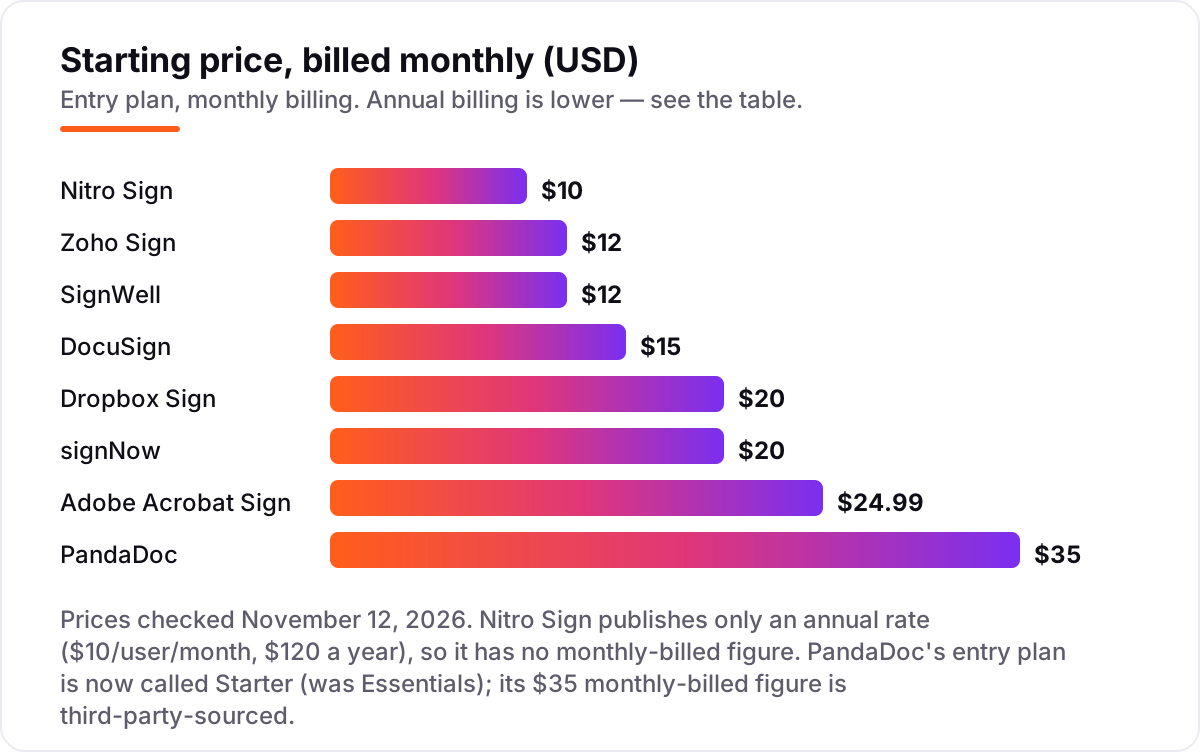
Digital signature software pricing: what you will actually pay
Take a five-person business sending about 40 documents a month. On annual billing, the subscription costs $96 a year on signNow Business, $600 on Zoho Sign Standard and SignWell Light, $899.40 on Adobe Acrobat Standard, $1,140 on PandaDoc Starter and $1,500 on DocuSign Standard and Dropbox Sign Standard. Nitro Sign Standard costs $600 a year for the same team. DocuSign Personal cannot serve this team at all: it is a single-user plan, so the five-person price is Standard, not Personal.
On monthly billing the same team pays $20 a month on signNow Business, $60 on Zoho Sign Standard and SignWell Light, $124.95 on Adobe Acrobat Standard, $150 on Dropbox Sign Standard, $175 on PandaDoc Starter and $225 on DocuSign Standard. Nitro Sign has no monthly-billed price, so there is no monthly figure for it. The gap between the two billing columns is the annual discount: signNow drops from $20 to $8 a month, PandaDoc from $35 to $19 a seat, and DocuSign Standard from $45 to $25 a user.
Three costs sit outside every number above. First, the sending cap: DocuSign Standard allows 100 envelopes per user a year on annual billing, which is 500 a year for this team — just above the 480 documents it sends — while Dropbox Sign, PandaDoc and SignWell put no cap on paid sends. Second, identity checks: DocuSign charges per SMS delivery and per ID verification, and Zoho Sign charges prepaid credits for SMS authentication and bulk sends. Third, the branding step-up: a business that wants its own logo on the signing page pays $49 a seat a month for PandaDoc Business, $25 a user for Dropbox Sign Standard or $16 a user for Zoho Sign Professional, all billed annually.
Know the difference: electronic signature, digital signature and digital certificate
The confusion in this category is the name on the box. An electronic signature is any electronic mark of agreement: a typed name, a drawn squiggle with a mouse, or a click on an "I agree" button. A digital signature is a specific kind of electronic signature that uses a certificate and cryptography to prove who signed and that the document was not changed after signing. A digital certificate is the credential itself, issued by a trusted authority, that makes the cryptographic check possible.
Almost every tool sold as "digital signature software" — including all eight in this list — is really electronic signature software. That is fine for most US business contracts: an electronic signature is legally binding under the federal ESIGN Act and state UETA laws, and every tool here backs it with an audit trail recording who signed, when, and from where. A true certificate-based digital signature matters in narrower cases: regulated industries, government filings, and EU contracts that require a qualified electronic signature, or QES. Zoho Sign Enterprise and Adobe Acrobat Sign cover QES; DocuSign, PandaDoc and the rest cover the everyday contract. Buy the certificate tier only when a counterparty or a regulator asks for it by name — for a sales contract or an NDA, the standard electronic signature is the right tool.
Quick comparison: tool type by need
| Buyer | Best pick | Why |
|---|---|---|
| Solo sender who signs a few documents a month | SignWell | $10/month billed annually, unlimited documents |
| Small business that wants the safest default | DocuSign | $15/month, the brand counterparties already accept |
| Sales team that sells with proposals | PandaDoc | $19/seat/month billed annually, documents and signing in one file |
| Team that wants to stop counting envelopes | Dropbox Sign | $15/month billed annually, unlimited requests |
| Team with many senders on a tight budget | signNow | $8/month billed annually for unlimited users |
| Business already running on Zoho | Zoho Sign | $10/user/month billed annually, 25 envelopes a month |
Mistakes to avoid
- Comparing monthly prices without checking billing. The annual price is usually 20–60% lower — signNow drops from $20 to $8 a month, PandaDoc from $35 to $19 a seat — and Nitro Sign publishes no monthly price at all.
- Ignoring the sending meter. DocuSign counts envelopes, Dropbox Sign counts signature requests, PandaDoc and SignWell count documents. A 100-envelope annual cap and unlimited requests are not the same product at the same price.
- Paying for a PDF suite when you only need signatures. Adobe Acrobat Sign is a good buy for a team that edits PDFs daily; a team that only signs pays $14.99 a month for tools it never opens.
- Trusting a directory price. PandaDoc's entry plan is now called Starter, not Essentials, and G2 still lists Nitro Sign at a stale $15. Always check the vendor's own page.
- Forgetting the free-plan caps. PandaDoc stops at 5 documents a month, Zoho Sign at 5, Dropbox Sign at 3 requests and SignWell at 3 documents. A free plan that runs out mid-month forces an upgrade at the worst moment.
How we chose
We verified each vendor's own pricing page on November 12, 2026 and recorded the starting price exactly as shown, including the annual-billing figure where the page lists one, and we ranked the tools by fit for the most common buyer — a small US business sending a few dozen documents a month — not by brand size. Direct page fetches were unavailable that day, so prices and ratings were verified from fresh search-index copies of the vendor's own pricing pages and the G2 review pages, all crawled within the last few days. Three prices needed extra care. PandaDoc's entry plan is now called Starter, not Essentials; its $19 annual figure comes from PandaDoc's own pages, and the $35 monthly-billed figure is confirmed by three independent November reads of the same page. Nitro Sign publishes only an annual rate, so it has no monthly-billed figure. signNow's own pages word the Business price both per account and per user, but the $8 annual figure is the same on both. Ratings come from G2: DocuSign 4.5 from 2,923 reviews, PandaDoc 4.7 from 3,994, Dropbox Sign 4.7 from 2,283, Adobe Acrobat Sign 4.4 from 1,074, Zoho Sign 4.4 from 64, SignWell 4.8 from 572 and Nitro Sign 4.6 from 9. signNow shows no rating because the freshest G2 copy in the search index was over 250 days old. No vendor paid for a place in this list, and none of the links here are affiliate links.
What to do next
Start with the free plan or trial of your top pick and send one real contract through it. Check that the signer gets a clean signing link with no account needed, that the completed document comes back with a full audit trail, and that the template and reminder features work the way your team actually sends. If the business is sorted but new clients are not finding it, our monthly SEO service handles the visibility side. Once your tools are in place, find out what's holding your rankings back.
Frequently asked questions
What is the best digital signature software?
DocuSign is the best default for most small businesses at $15 a month, because counterparties already accept it. PandaDoc is the best pick for sales teams at $19 a seat a month billed annually, since it builds the proposal and collects the signature in one file. SignWell is the best value for a solo sender at $10 a month billed annually, with unlimited documents.
How much does digital signature software cost?
Entry plans run $8 to $35 a month. A five-person team sending 40 documents a month pays $96 a year on signNow Business, $600 on Zoho Sign or SignWell, $899.40 on Adobe Acrobat Standard, $1,140 on PandaDoc Starter and $1,500 on DocuSign Standard or Dropbox Sign Standard, all on annual billing.
Is there free digital signature software?
Yes, with caps. PandaDoc sends 5 documents a month free, Zoho Sign 5, Dropbox Sign 3 signature requests a month and SignWell 3 documents a month. DocuSign, signNow, Adobe Acrobat Sign and Nitro Sign have no free plan, only a free trial. Free plans suit occasional senders; anyone sending weekly needs a paid plan.
What is the difference between a digital signature and an electronic signature?
An electronic signature is any electronic mark of agreement — a typed name, a drawn squiggle or a click. A digital signature is a specific kind that uses a certificate and cryptography to prove who signed and that the document was not changed. Most tools in this list sell electronic signatures; true digital signatures use certificates such as AATL or the EU's qualified electronic signature.
Do I need a digital certificate to sign documents?
No, not for most US business contracts. An electronic signature is legally binding under the federal ESIGN Act and state UETA laws, and every tool in this list produces one with an audit trail. A certificate-based digital signature is needed mainly for regulated deals, government filings and EU contracts that require a qualified electronic signature.
Can I switch digital signature software later?
Yes, but finish what is in flight first. Let every envelope already sent come back signed before you cancel, because a cancelled account can strand an unsigned document. Then export your templates and contacts, rebuild the templates in the new tool, and send one test document end to end before moving the whole team over.
What should I check before paying for digital signature software?
Check what the plan meters — envelopes, signature requests or documents — and whether the cap is per user, per account or per month. Check whether the price is per seat or per account, whether custom branding is included or on a higher tier, and whether the free plan or trial covers your real sending volume before the first payment.
Sources we checked (15)
- DocuSign pricing — docusign.com/blog/docusign-plans-and-pricing (checked November 12, 2026)
- DocuSign on G2 — 4.5/5, 2,923 reviews (checked November 12, 2026)
- PandaDoc pricing — pandadoc.com/blog/pandadoc-pricing-value (checked November 12, 2026)
- PandaDoc on G2 — 4.7/5, 3,994 reviews (checked November 12, 2026)
- Dropbox Sign pricing — sign.dropbox.com/products/dropbox-sign/pricing (checked November 12, 2026)
- Dropbox Sign on G2 — 4.7/5, 2,283 reviews (checked November 12, 2026)
- signNow pricing — signnow.com/features/signnow-plans-and-pricing (checked November 12, 2026)
- Adobe Acrobat pricing — adobe.com (checked November 12, 2026)
- Adobe Acrobat Sign on G2 — 4.4/5, 1,074 reviews (checked November 12, 2026)
- Zoho Sign pricing — zoho.com/sign (checked November 12, 2026)
- Zoho Sign on G2 — 4.4/5, 64 reviews (checked November 12, 2026)
- SignWell pricing — signwell.com (checked November 12, 2026)
- SignWell on G2 — 4.8/5, 572 reviews (checked November 12, 2026)
- Nitro Sign pricing — gonitro.com/secure-compliant-esignatures-nitro-sign (checked November 12, 2026)
- Nitro Sign on G2 — 4.6/5, 9 reviews (checked November 12, 2026)
Make one of these tools?
We re-check this list every quarter. Send a correction, request a review, or ask about a clearly labeled sponsored spot.
Request a listingShamim
Founder of SerpAstra
A full-stack SEO and digital marketer who spends most days on Local SEO for dental practices, AI search visibility and lead generation.
Free SEO and AI visibility audit
Find out what is holding your rankings back
Send us your site. Within 2 business days you get a written audit, an AI visibility check and a short fix list ranked by impact. Free, with no contract attached.
Request my free audit→Related buying guides
 Legal12 Best Contract Management Software Reviews in 2026, Compared12 best contract management software reviews compared on price, free plans and AI features, with prices checked November 10, 2026 — eight tools are quote-only.Read guide →
 Productivity & Office10 Best PDF Software for Small Business in 2026, ComparedCompare the 10 best pdf software for small business options on price, free plans and features, with every price checked on November 12, 2026.Read guide →
 Real Estate & Property Management10 Best E-Signature Software for Real Estate in 2026, ComparedCompare the 10 best e-signature software for real estate on price, free plans, forms and broker review, with every price checked November 7, 2026.Read guide →