
8 Best Digital Experience Analytics Platforms in 2026, Compared
Compare the 8 best digital experience analytics platforms on price, free plans and features for small teams, with every price checked November 12, 2026.
 Shamim Mia, Founder, SerpAstraLast verified November 12, 202612 min read
We compare pricing pages, documentation and public reviews. We never accept payment for rankings.
Key takeaways
- Microsoft Clarity leads for most teams at $0, with Contentsquare Growth from $49 a month and Smartlook from $55.
- The single most important buying factor is the billing unit: sessions, events and replays are three different meters, and the wrong one turns a cheap plan into a dear one.
- All 8 tools have a free plan, but retention, session caps and AI features usually need a paid plan.
- Every price below was checked on November 12, 2026, against the vendor's own pricing page or a fresh read of it. Ratings are G2, with review counts shown.
On this page
Quick comparison
| Tool | Best for | Starting price | Free plan |
|---|---|---|---|
| Microsoft Clarity | Small businesses and solo site owners who want unlimited session recordings and heatmaps for $0 | Free | Yes (free forever) |
| Smartlook | Small product and marketing teams that want recordings, heatmaps and funnels in one affordable plan | $55/mo | Yes (free plan) |
| Mouseflow | Small businesses and marketers who want six heatmap types plus funnels and form analytics | $39/mo | Yes (free plan) |
| Contentsquare | Growing ecommerce and marketing teams that want the deepest behaviour analysis without an enterprise contract | $49/mo | Yes (free plan) |
| LogRocket | Product and engineering teams that need to debug exactly why a session broke | $83/mo (annual) | Yes (free plan) |
| FullStory | Mid-market and enterprise teams that want searchable, high-fidelity replay plus AI analysis | Custom quote | Yes (free plan) |
| Amplitude | SaaS and app teams that need funnels, retention and cohorts on top of session replay | $0 start | Yes (free plan) |
| Mixpanel | Product teams that want deep funnel and retention analysis without hiring a data team | $0 start | Yes (free plan) |
Make one of these tools?
We re-check this list every quarter. Send a correction, request a review, or ask about a clearly labeled sponsored spot.
Request a listingThe best digital experience analytics platforms

Microsoft Clarity
Best for: Small businesses and solo site owners who want unlimited session recordings and heatmaps for $0
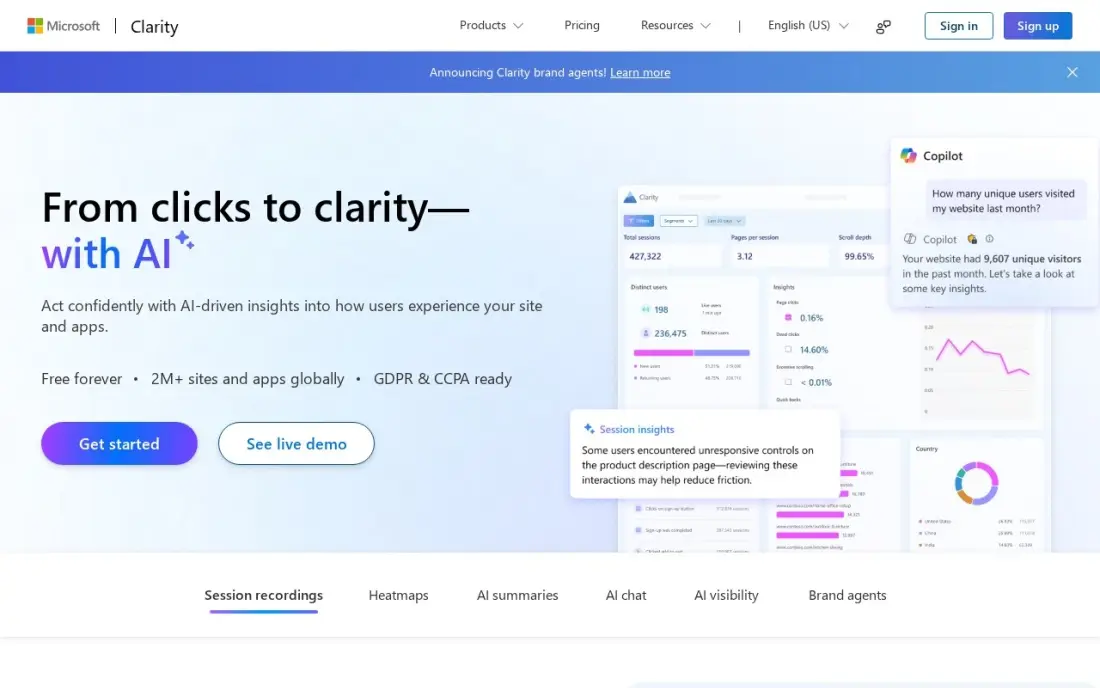
Microsoft Clarity is the free starting point, and for many small sites it is also the finishing point: unlimited session recordings, unlimited heatmaps and built-in Copilot AI summaries for $0, with no paid tier behind it. The heatmaps go further than most paid tools at this level, with dead-click maps showing where visitors click things that do nothing and error-click maps showing where a click triggers a JavaScript error.
The trade-off is depth and memory. Recordings are kept for 30 days, so you cannot look back at last quarter, and there is no cohort or retention analysis — Clarity shows what happened inside one session, not how behaviour changes across groups of users. If you need deeper funnels, pair it with a product analytics tool; if you need to see where visitors struggle, start here and pay nothing.
What we like
- Free forever with no traffic caps: unlimited recordings and heatmaps, up to 100,000 sessions per project per day
- Dead-click and error-click heatmaps show exactly where visitors click things that do nothing or break
- Copilot AI summaries and a native GA4 integration come free on every account
- No credit card, no session sampling, no paid tier to grow into
Watch out for
- Recordings are kept only 30 days, so long-term trend analysis is out
- No deep funnels or cohort analysis — it shows what happened in a session, not how behaviour changes across user groups
- Microsoft uses aggregated, anonymised Clarity data to improve its own products, and EEA, UK and Swiss traffic needs a consent signal since October 31, 2025

Smartlook
Best for: Small product and marketing teams that want recordings, heatmaps and funnels in one affordable plan
Smartlook is the sensible paid step up once Clarity's 30-day memory runs out: Pro covers 5,000 sessions a month for $55, with recordings, heatmaps, funnels and event tracking in one place, plus mobile app recording. The free plan is genuinely useful too: 3,000 sessions a month with the same core tools, so a small team can run it for months before paying.
The limits are volume and history. Five thousand sessions is not much for a busy store, extra sessions push the bill up in steps, and Pro keeps only three months of data. G2 reviewers rate Smartlook the easiest of the paid tools to set up, and the flat monthly price means seats never change the bill. Pick it when you want one tool for recordings, heatmaps and funnels at a fixed price.
What we like
- Free plan covers 3,000 sessions a month — the most generous free replay allowance here after Clarity
- Recordings, heatmaps, funnels and events in one plan, with mobile app recording included
- G2 reviewers rate it the easiest of the paid tools to set up, with a 9.1 ease-of-setup score
- Flat per-month pricing with no per-seat charge
Watch out for
- The 5,000-session Pro allowance runs out fast on a busy site, and extra sessions push the bill up
- Only 3 months of data retention on Pro — a year of history needs Enterprise
- No AI summaries on the entry plan; the deeper analytics sit on higher tiers

Mouseflow
Best for: Small businesses and marketers who want six heatmap types plus funnels and form analytics
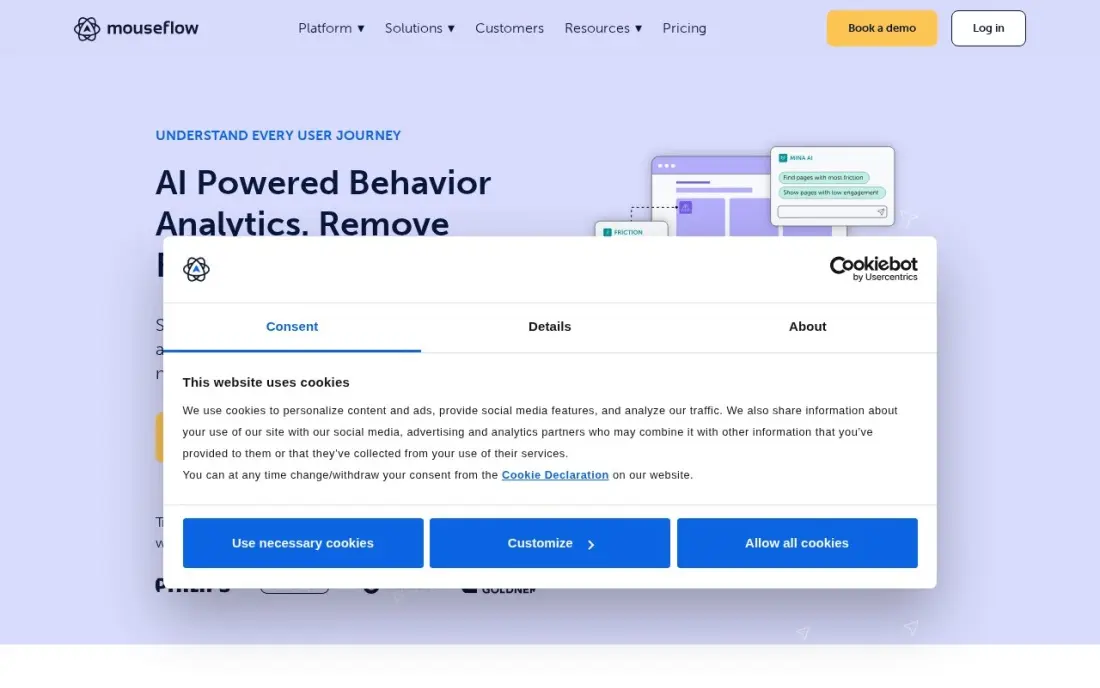
Mouseflow is the heatmap specialist in this list: six heatmap types — click, scroll, movement, attention, geo and live — against one or two on most rivals, plus session replay, funnels and form analytics from Starter at $31 a month billed annually. The form analytics alone is worth the price for a business that lives on leads: it shows which field makes visitors abandon a form, and the friction score points you at the sessions most worth watching.
Starter covers 5,000 sessions a month, and when the allowance runs out, tracking stops until the next month. Feedback surveys and attention heatmaps wait for higher tiers, and the price climbs in big jumps once traffic grows past Starter. Buy Mouseflow when heatmaps and forms are the job; buy Smartlook when you want funnels and events at a similar price.
What we like
- Six heatmap types — click, scroll, movement, attention, geo and live — more than any other tool here
- Form analytics shows exactly which fields make visitors abandon a form
- A friction score flags the sessions most worth watching, instead of leaving you to browse at random
- Records every session rather than sampling, and stores data in the EU or US
Watch out for
- Starter covers only 5,000 sessions a month, and tracking stops when the allowance runs out
- Feedback surveys and attention heatmaps need higher tiers
- G2 reviewers note the price climbs fast once traffic grows past Starter

Contentsquare
Best for: Growing ecommerce and marketing teams that want the deepest behaviour analysis without an enterprise contract
Contentsquare is the deepest platform in this list, and the Growth plan makes that depth reachable: $49 a month buys zone-based heatmaps that tie every click to the revenue behind it, journey analysis that shows the paths visitors actually take, and Sense AI summaries of replays and heatmaps. The free plan is generous too — 200,000 sessions a month — though it records replays for only 5% of them, up to 10,000 a month.
The catch is that Growth is priced by session volume, so the bill climbs from $49 as traffic grows, reaching $739 a month at 200,000 sessions, and Pro and Enterprise are quote-only sales conversations. G2 reviewers also flag a steep learning curve. Pick Contentsquare when you need to prove which UX fix is worth the money; pick Smartlook or Mouseflow when a smaller tool will do.
What we like
- Zone-based heatmaps tie every click to the revenue behind it, with impact quantification on Growth
- Journey analysis shows the paths visitors actually take, not just the pages they land on
- Sense AI summarises replays and heatmaps, and the free plan covers 200,000 sessions a month
- Hotjar's surveys and feedback now sit in the same platform as Voice of Customer
Watch out for
- Growth is priced per session volume, so the bill rises from $49 as traffic grows — $739 a month at 200,000 sessions
- Pro and Enterprise are quote-only, and published contract data puts them at roughly $50,000–$163,000 a year
- G2 reviewers flag a steep learning curve and scattered documentation

LogRocket
Best for: Product and engineering teams that need to debug exactly why a session broke
LogRocket is the tool for the question of why a session broke. Every replay is paired with the console logs, network requests and JavaScript errors behind it, so a developer can watch a user hit an error and see the exact failing call in the same view. Core starts at $83 a month billed annually for 10,000 sessions, with heatmaps, funnels, alerting and surveys included, and analytics, error and log events are unlimited — only captured sessions are metered.
Pricing is a calculator, not a price list, and the bill climbs fast: $176 a month at 25,000 sessions and $333 at 50,000, with no month-to-month price published. Galileo AI, the feature that searches sessions for you, needs Pro. Buy LogRocket when debugging is the job; buy a behaviour tool when the question is what visitors do, not what broke.
What we like
- Pairs every replay with the console logs, network requests and JavaScript errors behind it
- Analytics events, error events and log events are unlimited — only captured sessions are metered
- Galileo AI search finds the sessions that matter on Pro, and the free plan covers 1,000 sessions a month
Watch out for
- Pricing is a session-volume calculator, and the bill climbs fast: $176 a month at 25,000 sessions, $333 at 50,000
- No month-to-month price is published — every figure on the page is an annual-plan figure
- Built for engineers; marketers rarely log in twice, per multiple reviews

FullStory
Best for: Mid-market and enterprise teams that want searchable, high-fidelity replay plus AI analysis
FullStory is the enterprise replay tool in this list, built on autocapture: every click, scroll and interaction is recorded with no manual tagging, and search works like Google for sessions — find any behaviour by event, frustration signal or user in seconds. The free plan is the most generous here after Clarity, with 30,000 sessions a month for up to 10 users and 12 months of retention, so a team can run real analysis before ever talking to sales.
The paid plans are the problem for budgeting: Business, Advanced and Enterprise are all custom quotes, and market data puts typical small-team contracts at $10,000 to $25,000 a year. Mobile analytics is a paid add-on, and StoryAI needs a paid plan. Pick FullStory when search-everything replay is the core need; pick Contentsquare when you need revenue-tied heatmaps instead.
What we like
- Autocapture records every click, scroll and interaction with no manual tagging
- Search works like Google for sessions — find any behaviour by event, frustration signal or user
- StoryAI summarises sessions and surfaces opportunities on paid plans
- Free plan is the most generous here after Clarity: 30,000 sessions a month for 10 users
Watch out for
- No published prices — every paid plan is a custom quote, and market data puts typical small-team contracts at $10,000–$25,000 a year
- Mobile analytics is a paid add-on on every plan
- G2 reviewers cite cost at scale and a learning curve for the deeper analysis features

Amplitude
Best for: SaaS and app teams that need funnels, retention and cohorts on top of session replay
Amplitude is the product-analytics entry here: it answers what users do inside a product — which features they use, where they drop out of a funnel, who comes back — rather than what one visitor did on one page. The free plan covers 2 million events a month forever with 10,000 session replays included, and Plus starts at $0, charging only above the free allowance, up to 70 million events.
Event billing is the thing to model first: $75 a month at 3 million events and $576 at 10 million billed annually, with no cap on the bill. Exceeding the free allowance three times locks the account, and it is deleted six months later if you do not upgrade. Buy Amplitude when funnels and retention are the job; buy a replay tool when watching individual sessions matters more.
What we like
- Free plan covers 2 million events a month forever, with 10,000 session replays included
- Funnels, retention, cohorts and behavioural segmentation in one place, plus AI Agents on every plan
- Plus scales by event volume to 70 million events a month before a sales conversation is needed
Watch out for
- Event-based billing is hard to budget: $75 a month at 3 million events, $576 at 10 million, billed annually
- Exceeding the free 2 million events three times locks the account, and it is deleted six months later if you do not upgrade
- G2 reviewers note a steep learning curve and cost concerns as usage scales

Mixpanel
Best for: Product teams that want deep funnel and retention analysis without hiring a data team
Mixpanel is the analyst's tool in this list: deep funnel analysis, retention curves and cohort reports with a polished interface, plus session replay on every plan. The free plan covers 1 million events and 10,000 replays a month with no credit card, and Growth publishes its full price list — $140 a month at 1.5 million events billed monthly, $100 billed annually — which is still rare in product analytics.
The setup is the honest cost. Every action you want to measure has to be named and added to your code, usually by an engineer, and going over 1 million events on the free plan freezes your queries until you upgrade. Group analytics and data pipelines are paid add-ons. Pick Mixpanel when funnel and retention depth matters most; pick Amplitude when you want the larger free event allowance.
What we like
- Free plan covers 1 million events and 10,000 session replays a month with no credit card
- Growth publishes its full price list — $140 a month at 1.5 million events, $1,176 at 10 million
- Session replay is included on every plan, and heatmaps do not count toward billable events
Watch out for
- Every action you want to measure has to be named and added to code, usually by an engineer
- Going over 1 million events on Free freezes your queries until you upgrade, and the whole month counts toward volume
- Group analytics and data pipelines are paid add-ons, not in the base price
The 8 best digital experience analytics platforms below are ranked by fit for the most common buyer — a small or mid-size team that wants to see why visitors struggle on its site or inside its product — and every price was checked on November 12, 2026. The list runs from free tools to enterprise quotes, because the right answer for a 5,000-visit blog and a 5-million-session store is never the same tool.
How to choose the best digital experience analytics platforms
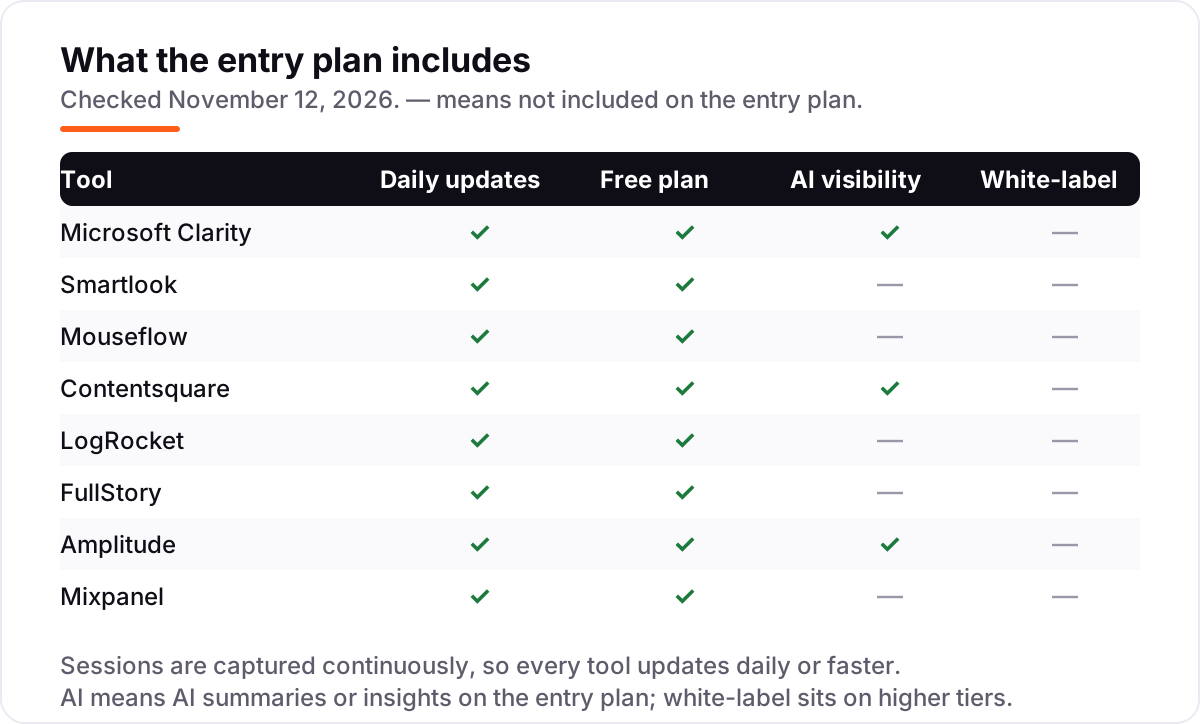
- Count the billing unit first. Sessions, events and replays are three different meters: Clarity and Contentsquare charge by sessions, Amplitude and Mixpanel by events, and the free allowances behind each one are not comparable.
- Check what the free plan really covers. Contentsquare Free covers 200,000 sessions but records replays for only 5% of them; Clarity is unlimited; LogRocket Free stops at 1,000 sessions a month.
- Check retention before you buy. Clarity keeps recordings 30 days, Smartlook Pro three months, Contentsquare Growth thirteen months — a free plan with short memory cannot answer last quarter's question.
- Decide replay or analytics. Replay tools show one person's session; product analytics tools count behaviour across all users. Most tools here bundle both, but they lean one way.
- Check the consent and privacy rules. Clarity needs a consent signal for EEA, UK and Swiss traffic, and every tool stores data differently — check the data processing agreement before installing.
- Try it on your real traffic. Every tool here has a free plan or trial, so run your real volume for two weeks and watch the caps, not the feature list.
If the replays show visitors arriving and leaving without converting, the problem may be who arrives, not the page — our AI search optimization service covers that side. And before you rewrite the pages your replays flag as broken, run the new titles through the free SERP snippet preview tool to see how they will look in Google.
Digital experience analytics platforms pricing: what you will actually pay
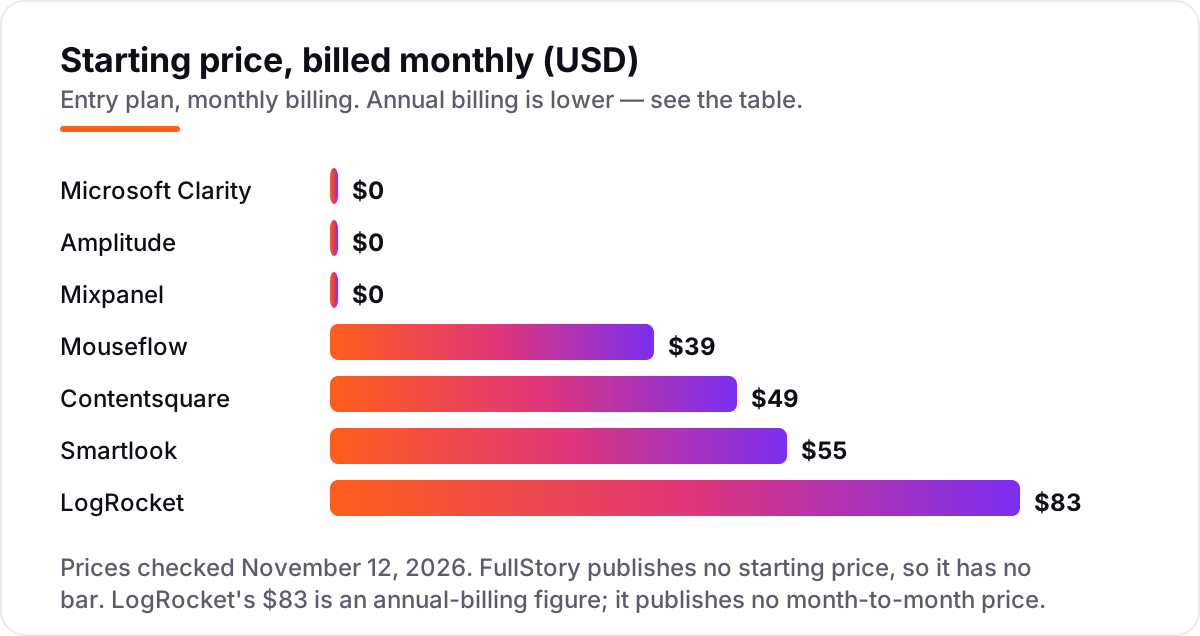
Take a small site with 5,000 sessions a month. On list prices, Clarity costs $0, Contentsquare Free costs $0, FullStory Free costs $0, Amplitude Free costs $0 and Mixpanel Free costs $0 — five of the eight tools charge nothing at this volume. The three that charge are Smartlook Pro at $55 a month, Mouseflow Starter at $39 a month billed monthly ($31 billed annually) and LogRocket Core at $83 a month billed annually. Over a year, that is $0 on the five free tools, $372 on Mouseflow billed annually, $660 on Smartlook and $996 on LogRocket. Paying for all three at once costs $2,028 a year — but nobody should: pick the one that matches the question you need answered, and run the free tools alongside it.
Two costs sit outside every number above. First, events: a 5,000-session site sends far fewer than Amplitude's 2 million or Mixpanel's 1 million free events a month, so both stay free at this size — but a busy app can cross those lines fast, and then the bill follows events, not sessions. Second, volume: Contentsquare Growth starts at $49 for 7,000 sessions and Smartlook Pro covers 5,000, so a site that doubles its traffic outgrows both entry prices and moves to the next tier.
Know the difference: session replay vs product analytics
The confusion in this category is that the two jobs sound the same and most tools now sell both. Session replay records individual visits: you watch one person click, scroll, rage-click and leave, and you see the exact moment a page breaks for them. Product analytics counts behaviour across every user: how many people reach each step of a funnel, how many come back after a week, which cohort converts best. Replay answers "what happened to this person"; analytics answers "what happens to people like them".
Buy replay when you need to find the problem, and analytics when you need to measure whether the fix worked. A heatmap that shows nobody clicks your buy button is a replay-style insight; a funnel that shows 40% of users drop out at checkout is an analytics insight. The billing follows the job too: replay tools charge by sessions captured, analytics tools by events tracked, so a site with heavy traffic pays for sessions while an app with chatty users pays for events. Check which meter your usage actually moves before comparing the prices.
Quick comparison: tool type by need
| Buyer | Best pick | Why |
|---|---|---|
| Small business that wants to pay $0 | Microsoft Clarity | Free forever, unlimited recordings and heatmaps |
| Small team that wants the best paid all-rounder | Smartlook | Recordings, heatmaps and funnels from $55/month |
| Marketer who lives in heatmaps and forms | Mouseflow | Six heatmap types and form analytics from $31/month billed annually |
| Growing store that needs revenue-tied insights | Contentsquare | Zone-based heatmaps and impact scoring from $49/month |
| Product team debugging broken sessions | LogRocket | Replays paired with logs and errors from $83/month billed annually |
| Enterprise team that needs searchable replay | FullStory | Autocapture and StoryAI; paid plans are custom quotes |
| SaaS team measuring feature usage | Amplitude | Funnels and retention with 2 million free events a month |
Mistakes to avoid
- Comparing prices without checking the billing unit. Sessions, events and replays are different meters — a $0 plan that counts events is not the same deal as a $0 plan that counts sessions, and the bill moves with whichever meter your traffic pushes.
- Trusting a directory price. LogRocket's old Team plan still shows as $69 or $99 on several directories, but the live page is a calculator where Core starts at $83 a month billed annually; Mixpanel's annual figure at 1.5 million events is $100, not the $120 some pages still show.
- Buying on the free plan's headline. Contentsquare Free covers 200,000 sessions but records replays for only 5% of them, Clarity keeps recordings 30 days, and Mixpanel Free freezes your queries once you pass 1 million events.
- Paying for replay when you need analytics, or the reverse. Watching sessions will not give you a retention curve, and a funnel will not show you the broken button — buy the tool that answers the question you actually have.
- Forgetting consent and privacy. Clarity has needed a consent signal for EEA, UK and Swiss traffic since October 31, 2025, and every tool stores data in different regions with different retention — check the data processing agreement before installing.
How we chose
We checked each vendor's pricing on November 12, 2026. Contentsquare's price comes from a fresh copy of its own pricing page; Clarity's free-forever status, Smartlook's $55, Mouseflow's $31 and $39, Amplitude's $0 start and Mixpanel's $140 and $100 come from the vendors' pricing pages as read by independent pricing guides in October and November 2026. LogRocket's $83 is third-party-sourced: its pricing page is a session-volume calculator, and three independent reads of it dated October 12 to 29, 2026 agree on $83 a month billed annually for 10,000 sessions, while older directories still list the retired Team plan at $69 to $99. Mixpanel's annual figure at 1.5 million events is $100 a month in the most recent reads, down from $120 earlier in 2026. Ratings come from G2 pages checked November 12, 2026. We ranked the tools by fit for the most common buyer — a small or mid-size team that wants to see why visitors struggle — not by brand size. No vendor paid for a place in this list, and none of the links here are affiliate links.
What to do next
Start with Clarity — it costs nothing and answers the first question, which pages make visitors struggle, within a day. Then trial your top paid pick on your real traffic for two weeks and compare its numbers against your analytics before paying. If the site is sorted but new visitors are not finding it, our monthly SEO service handles the visibility side — or compare providers in our guide to SEO companies for small business. Once your tools are in place, find out what's holding your rankings back.
Frequently asked questions
What is the best digital experience analytics platform?
Microsoft Clarity is the best starting point for most teams: unlimited recordings and heatmaps for $0. If you need deeper analysis, Contentsquare Growth from $49 a month is the strongest all-round paid pick, and Smartlook at $55 is the best value for a small team that wants recordings, heatmaps and funnels in one plan.
How much does digital experience analytics software cost?
From $0 to custom quotes. Clarity is free forever, and Contentsquare, FullStory, Amplitude and Mixpanel all have free plans. The first paid plans run $31 to $83 a month: Mouseflow Starter at $31 billed annually, Contentsquare Growth at $49, Smartlook Pro at $55 and LogRocket Core at $83 billed annually.
Is there a free digital experience analytics platform?
Yes — all eight tools here have a free plan. Clarity is free forever with no caps, Contentsquare Free covers 200,000 sessions a month, FullStory Free covers 30,000, Amplitude 2 million events and Mixpanel 1 million. The limits are retention and session caps, so check those before relying on a free plan.
What is the difference between session replay and product analytics?
Session replay records individual visits so you can watch one person struggle on a page; product analytics counts behaviour across all users in funnels, retention curves and cohorts. Replay finds the bug, analytics measures whether the fix worked. Most tools here bundle both, but Clarity and FullStory lean replay while Amplitude and Mixpanel lean analytics.
Do I need Contentsquare, or is Microsoft Clarity enough?
Clarity is enough if you only need to watch recordings and read heatmaps — it is free and unlimited. Contentsquare earns its price when you need revenue-tied heatmaps, journey analysis and AI summaries, or when 30-day retention is too short. Start with Clarity, and move up when you can name the question it cannot answer.
How do these tools handle privacy and consent?
Every tool here masks sensitive fields and offers data controls, but the rules differ by vendor and region. Microsoft Clarity has required a consent signal for EEA, UK and Swiss traffic since October 31, 2025. Before you install any of them, check the vendor's data processing agreement, where data is stored and how long recordings are kept.
What should I check before paying for a digital experience analytics platform?
Four things: what the price counts — sessions, events or replays — and what happens when you exceed it; how long data is kept; whether the AI features and white-label reports you want are on the plan you are buying; and whether the free plan or trial covers your real traffic volume. Then run the trial on real traffic for two weeks before paying.
Sources we checked (16)
- Microsoft Clarity — clarity.microsoft.com (free forever; checked November 12, 2026)
- Microsoft Clarity on G2 — 4.5/5, 55 reviews (checked November 12, 2026)
- Smartlook pricing — smartlook.com/pricing (checked November 12, 2026)
- Smartlook on G2 — 4.6/5, 874 reviews (checked November 12, 2026)
- Mouseflow pricing — mouseflow.com/pricing (checked November 12, 2026)
- Mouseflow on G2 — 4.6/5, 690 reviews (checked November 12, 2026)
- Contentsquare pricing — contentsquare.com/pricing (checked November 12, 2026)
- Contentsquare on G2 — 4.6/5, 747 reviews (checked November 12, 2026)
- LogRocket pricing — logrocket.com/pricing (calculator read October 12–29, 2026; checked November 12, 2026)
- LogRocket on G2 — 4.6/5, 2,486 reviews (checked November 12, 2026)
- FullStory pricing — fullstory.com/pricing (custom quote; checked November 12, 2026)
- FullStory on G2 — 4.5/5, 1,058 reviews (checked November 12, 2026)
- Amplitude pricing — amplitude.com/pricing (checked November 12, 2026)
- Amplitude on G2 — 4.4/5, 3,112 reviews (checked November 12, 2026)
- Mixpanel pricing — mixpanel.com/pricing (checked November 12, 2026)
- Mixpanel on G2 — 4.5/5, 1,376 reviews (checked November 12, 2026)
Make one of these tools?
We re-check this list every quarter. Send a correction, request a review, or ask about a clearly labeled sponsored spot.
Request a listingShamim
Founder of SerpAstra
A full-stack SEO and digital marketer who spends most days on Local SEO for dental practices, AI search visibility and lead generation.
Free SEO and AI visibility audit
Find out what is holding your rankings back
Send us your site. Within 2 business days you get a written audit, an AI visibility check and a short fix list ranked by impact. Free, with no contract attached.
Request my free audit→Related buying guides
 Marketing10 Best Website Heatmap Tools in 2026 (Free and Paid, Compared)Compare the 10 best website heatmap tools on price, free plans and session limits, from free Clarity to FullStory, with every price checked November 5, 2026.Read guide →
 Marketing11 Best Marketing Analytics Platforms in 2026, ComparedCompare the 11 best marketing analytics platforms in 2026 on price, free plans and reporting, with every price checked November 4, 2026 for US teams.Read guide →
 Data, Analytics & AI10 Best Digital Analytics Software in 2026, Compared10 best digital analytics software options compared on price, free plans and AI features, with every starting price checked on November 2, 2026.Read guide →