
10 Best Cross-Platform Password Managers in 2026, Compared
Compare the 10 best cross-platform password manager options for 2026 on price, free plans and security, with every price checked November 12, 2026.
 Shamim Mia, Founder, SerpAstraLast verified November 12, 202614 min read
We compare pricing pages, documentation and public reviews. We never accept payment for rankings.

Key takeaways
- 1Password leads for most people at $2.99 a month in year one, with Bitwarden from $1.65 a month and Dashlane from $4.99 a month.
- The single most important buying factor is the renewal price: 1Password, NordPass, Proton Pass and RoboForm all show a discounted first-year price that rises after year one.
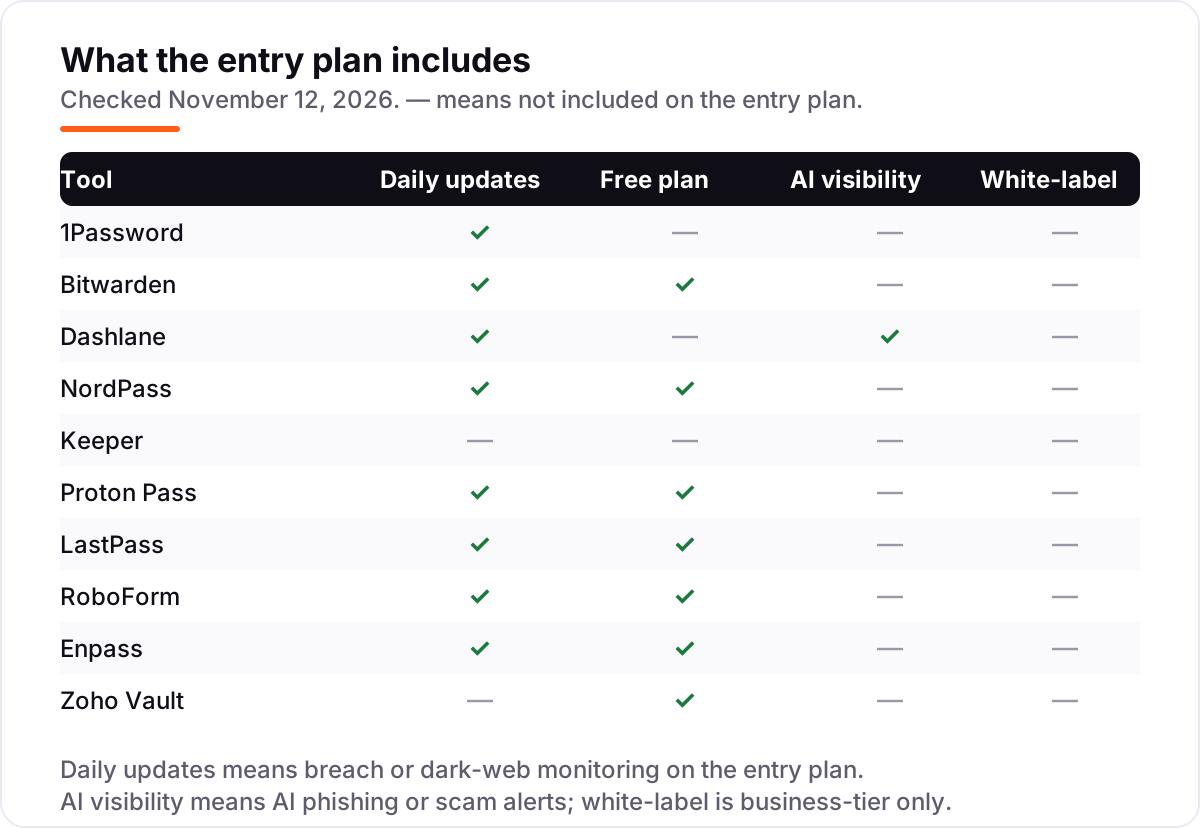
- Seven of the 10 tools have a genuinely free plan — Bitwarden, Proton Pass, Enpass, Zoho Vault, NordPass, LastPass and RoboForm — but free plans cap devices, items or both.
- Every price below was checked on the vendor's own pricing page on November 12, 2026. Ratings are G2, with review counts shown.
On this page
Quick comparison
| Tool | Best for | Starting price | Free plan |
|---|---|---|---|
| 1Password | Individuals and families who want the most polished cross-platform vault, with a Secret Key and Watchtower breach alerts | $2.99/mo (first year) | No (14-day trial) |
| Bitwarden | Individuals and households who want a genuinely free plan and the cheapest premium upgrade, with open-source code | $1.65/mo | Yes (free plan) |
| Dashlane | Individuals who want a password manager, a VPN and dark-web monitoring in one subscription | $4.99/mo | No (14-day trial) |
| NordPass | Individuals and families who want the cheapest premium plan from a major brand, with a free plan to start | $1.49/mo (2-year) | Yes (free plan) |
| Keeper | Small businesses and regulated teams that need compliance reports, admin controls and audit trails | $2.92/mo | No (30-day trial) |
| Proton Pass | Privacy-focused users already in the Proton ecosystem who want Swiss jurisdiction and email aliases | $1.99/mo (first year) | Yes (free plan) |
| LastPass | People who want a familiar, low-cost manager and already know LastPass from work | $3/mo | Yes (one device type) |
| RoboForm | Budget buyers who fill long web forms and want the lowest steady renewal price | $2.49/mo | Yes (single device) |
| Enpass | People who want their vault stored in their own cloud, with no vendor server holding it | $1.99/mo | Yes (25 items) |
| Zoho Vault | Small teams already using Zoho apps who want the cheapest per-seat team vault | $0.90/user/mo | Yes (free plan) |
Make one of these tools?
We re-check this list every quarter. Send a correction, request a review, or ask about a clearly labeled sponsored spot.
Request a listingThe best cross-platform password manager

1Password
Best for: Individuals and families who want the most polished cross-platform vault, with a Secret Key and Watchtower breach alerts
1Password is the most polished vault in this list: every account gets a Secret Key stored on the device, so the master password alone cannot open the vault even if it leaks, and Watchtower flags weak, reused and breached passwords around the clock. The Individual plan costs $2.99 a month billed annually in the first year, then $3.99 a month, and covers unlimited passwords and passkeys with 1 GB of document storage.
The catch is the price curve, not the product. There is no free plan, only a 14-day trial, and the second year costs $47.88 instead of $35.88. Families covers five people for $4.49 a month in year one. Pick 1Password when the vault holds the keys to everything and the interface has to be effortless; pick Bitwarden when the budget matters more than the polish.
What we like
- A Secret Key on top of the master password, so a stolen password alone cannot open the vault
- Watchtower flags weak, reused and breached passwords and watches for data breaches continuously
- Travel Mode removes sensitive vaults from devices when crossing borders, then restores them
- Apps and extensions for Windows, macOS, Linux, iOS, Android and every major browser, plus passkeys
Watch out for
- No free plan — only a 14-day trial before the subscription starts
- The $2.99 headline price is the first year only; it renews at $3.99 a month
- No monthly billing discount — the monthly rate is $7.99 if you pay month to month

Bitwarden
Best for: Individuals and households who want a genuinely free plan and the cheapest premium upgrade, with open-source code
Bitwarden is the value pick in this list because its free plan is a real product, not a trial: unlimited passwords on unlimited devices, with sync, for $0 forever. Premium costs $1.65 a month billed annually, or $19.80 a year, and adds a built-in authenticator, vault health reports, emergency access and 5 GB of encrypted file storage. Families is $47.88 a year for six people, which works out to $7.98 per person.
The price history deserves a note: Premium cost $10 a year for years, then rose to $19.80 in early 2026, so directories and older reviews still quote the old figure. The interface is plainer than 1Password and setup takes a few more clicks. Pick Bitwarden when the budget is tight or the household wants six premium accounts for under $50 a year.
What we like
- The only free plan here with unlimited passwords on unlimited devices, with no time limit
- Open-source clients and server, with a self-hosted option on the Teams and Enterprise plans
- Premium at $19.80 a year adds a built-in authenticator, vault health reports and 5 GB of file storage
- Families covers six people for $47.88 a year — $7.98 per person for the full Premium feature set
Watch out for
- Premium nearly doubled in early 2026, from $10 a year to $19.80 — the old price still appears in directories
- The interface is functional rather than polished, and setup takes more clicks than 1Password
- Premium is annual-only; there is no month-to-month option for the paid personal plan

Dashlane
Best for: Individuals who want a password manager, a VPN and dark-web monitoring in one subscription
Dashlane is the bundle pick: Premium at $4.99 a month billed annually buys the password manager plus a full Hotspot Shield VPN, dark-web monitoring and AI-powered phishing alerts, all in the base price rather than as add-ons. Friends & Family at $7.49 a month covers ten people, the largest household plan here, and Business at $8 a user a month adds the admin console and phishing protection for teams.
The price is the highest in this list, and there is no free plan any more — Dashlane retired it in September 2025, so new users get a 14-day trial and then pay. Renewals can also run above the first-year rate. Pick Dashlane when the VPN and the monitoring are worth paying for in one bill; pick NordPass or Bitwarden when the vault alone is enough.
What we like
- A full Hotspot Shield VPN is bundled with Premium, with no data cap
- Dark-web monitoring and AI-powered phishing alerts are included in the base price, not add-ons
- Friends & Family covers ten people for $7.49 a month — the largest household plan here
- Strong autofill and a clean interface across Windows, macOS, iOS, Android and browsers
Watch out for
- The free plan was retired in September 2025 — new users get a 14-day trial only
- The highest starting price in this list, at $59.88 a year for one person
- Renewal pricing can jump above the first-year rate, so check the renewal figure before subscribing

NordPass
Best for: Individuals and families who want the cheapest premium plan from a major brand, with a free plan to start
NordPass is the cheapest premium plan from a major brand: $1.49 a month on the 2-year plan, or $1.99 a month on the 1-year plan, for multi-device sync, a Data Breach Scanner, Password Health and email masking. It uses XChaCha20 encryption and has a clean security record — no public breach since its 2019 launch — and the Family plan covers six people for $2.79 a month on the 2-year plan.
The price to watch is the renewal. NordPass states plainly that renewal prices may be higher than the introductory rate, and it publishes no renewal figure, so the second term is a surprise. There is also no monthly-billing option for personal plans. Pick NordPass for the lowest premium price from a household name; pick RoboForm when the renewal price must be known in advance.
What we like
- The cheapest premium plan among the major brands at $1.49 a month on the 2-year plan
- XChaCha20 encryption and a clean record — no public breach since its 2019 launch
- Data Breach Scanner, Password Health and email masking are included on Premium
- Family covers six people for $2.79 a month on the 2-year plan
Watch out for
- The $1.49 rate is the 2-year plan — the 1-year plan costs $1.99 a month
- NordPass states renewal prices may be higher than the introductory rate, with no published renewal figure
- No monthly-billing option is published for personal plans, so the commitment is one or two years

Keeper
Best for: Small businesses and regulated teams that need compliance reports, admin controls and audit trails
Keeper is the compliance pick in this list. It holds SOC 2 Type II, ISO 27001 and FedRAMP authorization, the strongest audit portfolio here, and its business plans start at $2 a user a month for Business Starter, with an admin console, audit logs and granular sharing permissions. The Personal plan costs $2.92 a month billed annually, or $34.99 a year, and quantum-resistant cryptography began rolling out in 2026.
The headline price is only part of the bill. Dark-web monitoring (BreachWatch) costs $19.99 a year extra, and secure file storage is another $9.99 a year — both are included in the base price at 1Password and Dashlane. There is no free plan, only a 30-day trial. Pick Keeper when the business needs audit trails and compliance paperwork; pick 1Password when the household wants the monitoring included.
What we like
- SOC 2 Type II, ISO 27001 and FedRAMP authorization — the strongest compliance portfolio here
- Business plans start at $2 a user a month (Business Starter), with admin console and audit logs
- Secure sharing with granular permissions, plus an emergency-access contact on every plan
- Quantum-resistant cryptography began rolling out in 2026, ahead of most rivals
Watch out for
- Dark-web monitoring (BreachWatch) is a $19.99-a-year add-on, not included in the base price
- No free plan — only a 30-day trial before paying
- Secure file storage is another $9.99-a-year add-on, so the comparable total is higher than the headline

Proton Pass
Best for: Privacy-focused users already in the Proton ecosystem who want Swiss jurisdiction and email aliases
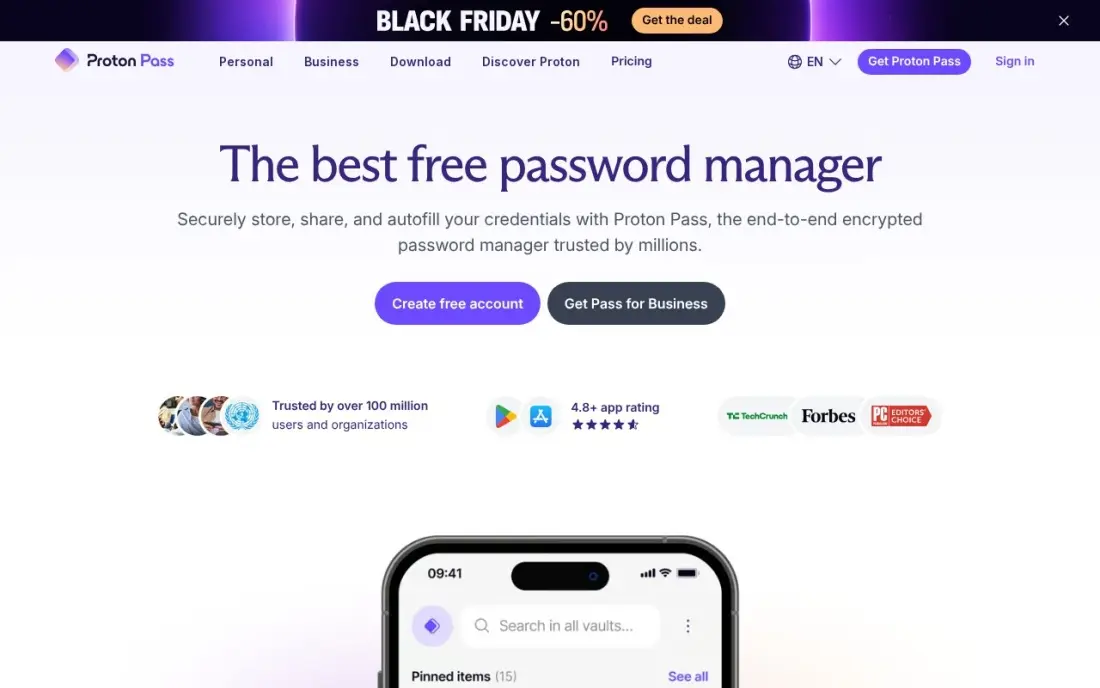
Proton Pass is the privacy pick: a Swiss company under Swiss privacy law, with open-source clients and a free plan that stores unlimited logins, notes and cards with sync. Pass Plus costs $1.99 a month billed annually in the first year, then $2.99 a month, and adds unlimited hide-my-email aliases, an integrated authenticator and dark-web monitoring. Pass Family covers six people for $2.79 a month in the first year.
Two honest limits. There is no desktop app — Proton Pass runs as a browser extension, mobile app or web vault — and G2 reviewers note thin folder management and a steeper learning curve than 1Password. The first-year price is also a promotion, not the steady price. Pick Proton Pass when privacy jurisdiction matters or the household already uses Proton Mail and VPN.
What we like
- Swiss jurisdiction under Swiss privacy law, with open-source clients
- Unlimited hide-my-email aliases on Plus, so every account gets a unique address
- Dark-web monitoring and an integrated authenticator are included on Plus
- The free plan is genuinely useful: unlimited logins, notes and cards, with sync
Watch out for
- The $1.99 headline price is a first-year promotion; it renews at $2.99 a month ($35.88 a year)
- No desktop app — Proton Pass runs as a browser extension, mobile app or web vault
- Folder management is thin, per G2 reviewers, and the learning curve is steeper than 1Password

LastPass
Best for: People who want a familiar, low-cost manager and already know LastPass from work
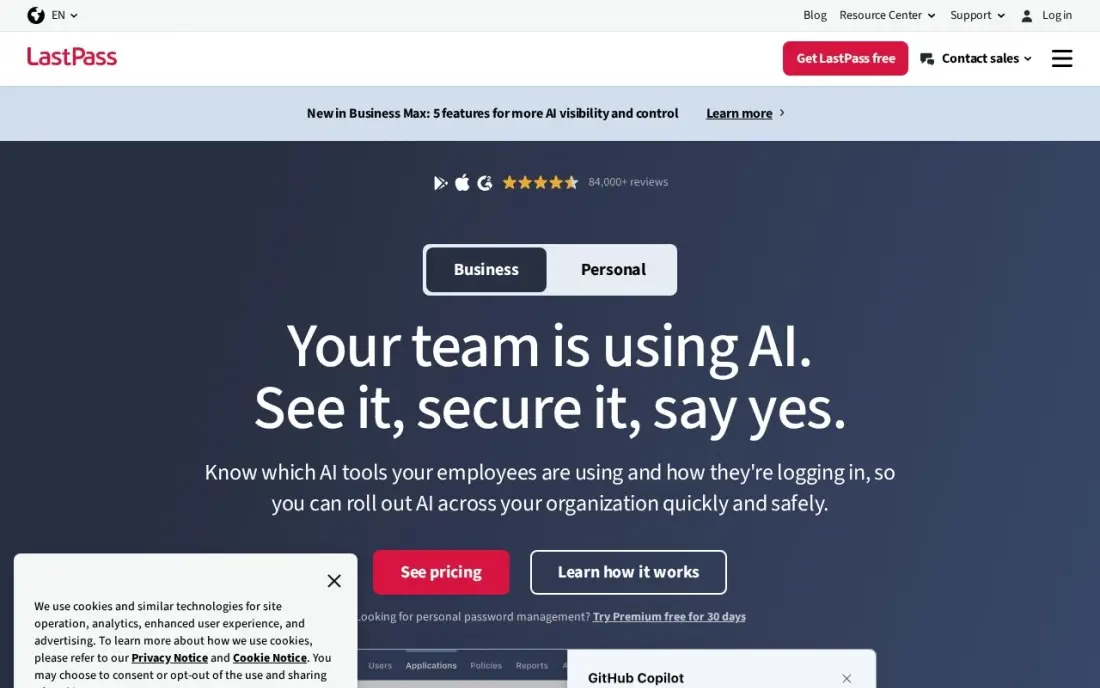
LastPass is still one of the cheapest paid plans here: Premium costs $3 a month billed annually, or $36 a year, with sync across all devices, passkeys, emergency access and 1 GB of encrypted file storage, and Families covers six people for $48 a year. It is also the most familiar name in the category, with the largest G2 review base in this list at 2,080 reviews.
The 2022 breach is the reason it sits this low. Attackers stole copies of customer vaults, and although LastPass has since raised its encryption defaults, the trust damage still follows it — and the free plan works on one device type only. Pick LastPass when the price and the familiarity win and the household understands the history; pick Bitwarden for the same money with a cleaner record.
What we like
- Premium at $36 a year is one of the cheaper paid plans, with sync across all devices
- Families covers six people for $48 a year — the joint-cheapest family plan here
- Emergency access, one-to-many sharing and 1 GB of encrypted file storage on Premium
- Dark-web monitoring and advanced multi-factor options, including YubiKey, on Premium
Watch out for
- Attackers stole copies of customer vaults in a 2022 breach — the trust damage still follows it
- The free plan works on one device type only (computers or phones, not both)
- Every paid plan bills annually — there is no month-to-month option

RoboForm
Best for: Budget buyers who fill long web forms and want the lowest steady renewal price
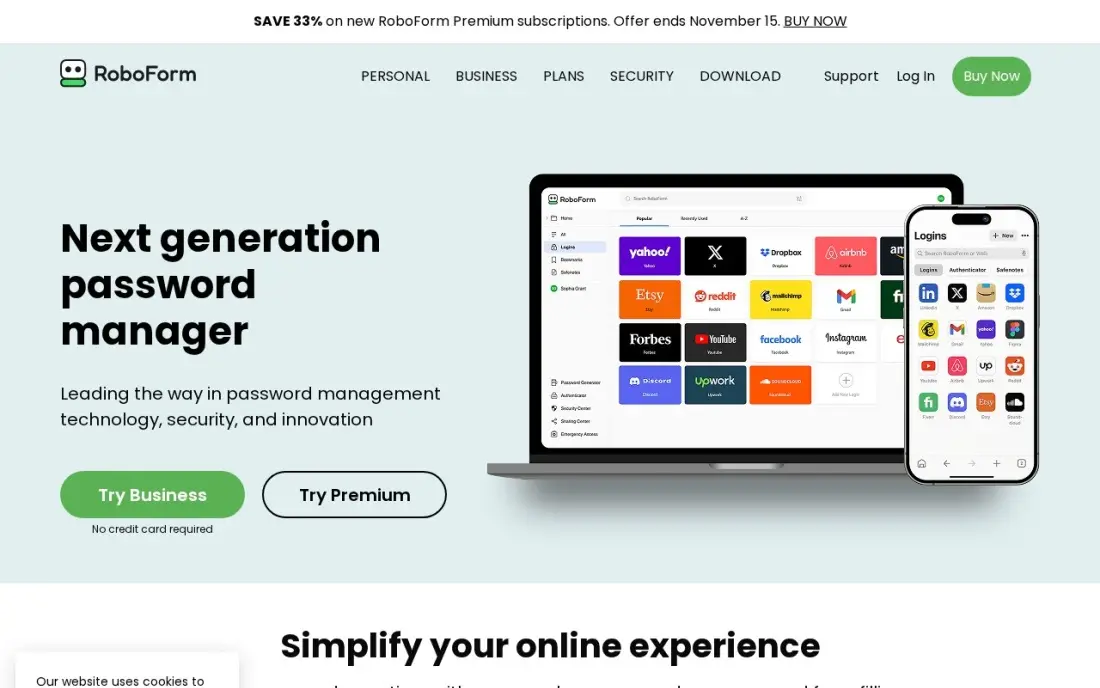
RoboForm has been filling forms since 2000, and it still does that job better than anything else here: one click completes long web forms, not just logins. Premium costs $2.49 a month billed annually, or $29.88 a year, with sync across unlimited devices, web access, secure shared folders, emergency access and breach monitoring for five email addresses. New users pay $19.90 for the first year.
The renewal is the honest number — $29.88 a year, every year — which is why RoboForm earns its place despite a plainer interface and a free plan that locks to one device. Business at $39.95 a user a year adds single sign-on and admin controls. Pick RoboForm when long forms are the daily pain, or when the renewal price must be known in advance.
What we like
- The best form filler here: one click completes long web forms, not just logins
- The renewal price is the price you keep — no introductory jump after the first year
- Breach monitoring for five email addresses and emergency access on Premium
- A local-only mode skips cloud sync entirely for users who want the vault off the internet
Watch out for
- The $19.90 first-year price renews at $29.88 — the sale price is not the price you keep
- The free plan locks you to a single device, which limits it in a multi-device household
- Linux and ChromeOS get the browser extension only, with no full desktop app
Enpass
Best for: People who want their vault stored in their own cloud, with no vendor server holding it
Enpass is the only tool here that never holds your vault: it lives encrypted in your own iCloud, Google Drive, OneDrive, Dropbox or Nextcloud, so there is no central server of customer vaults to attack. The Individual plan costs $1.99 a month billed annually, or $23.99 a year, and a 3-year plan costs $47.99 once — about $16 a year — with no auto-renewal. It also works fully offline, with local Wi-Fi sync.
The trade-off is recovery. There is no way back if the master password is lost — no reset, no support ticket that can open the vault — so the recovery key has to live somewhere safe. The free plan caps at 25 items in one vault. Pick Enpass when the vault must never sit on a vendor's server; pick Bitwarden when account recovery matters more.
What we like
- The vault lives in your own iCloud, Google Drive, OneDrive, Dropbox or Nextcloud — Enpass holds no copy
- A 3-year plan costs $47.99 once, about $16 a year, with no auto-renewal
- Works fully offline, with local Wi-Fi sync as an option that never touches the cloud
- Breach alerts and a built-in authenticator are included on the Individual plan
Watch out for
- No account recovery — if you lose the master password, the vault is gone for good
- The free plan caps at 25 items in one vault, so most people outgrow it fast
- The browser extension sometimes loses its connection to the desktop app and needs a relaunch, per G2 reviewers

Zoho Vault
Best for: Small teams already using Zoho apps who want the cheapest per-seat team vault
Zoho Vault is the cheapest way to put a whole team in a vault: Standard costs $0.90 a user a month billed annually, with shared vaults, role-based access and audit logs, and the Free Forever plan already stores unlimited passwords with autofill and a password generator. Professional at $4.50 a user a month adds user groups, shared folders and Active Directory integration for growing teams.
It is a team tool first, not a household one: there is no family plan, so a household pays one Standard seat per person, and there is no desktop app for any operating system. G2 reviewers also call the interface dated. Pick Zoho Vault when the business already runs on Zoho and every seat counts; pick Bitwarden Families when the buyers are a household.
What we like
- The cheapest paid team plan here: Standard is $0.90 a user a month billed annually
- A Free Forever plan stores unlimited passwords with autofill and a password generator
- Shared vaults, role-based access and audit logs from the Standard plan
- Professional at $4.50 a user a month adds user groups, shared folders and Active Directory
Watch out for
- No family plan — households need a different tool, or one Standard seat per person
- No desktop app for any operating system; it runs in the browser and on mobile
- The interface looks dated next to the polished rivals, per G2 reviewers
The best cross-platform password manager keeps one encrypted vault in sync across Windows, macOS, Linux, iOS, Android and every major browser, so the same logins work on every device you own. The 10 tools below are ranked by fit for the most common buyer, one person or household that wants the same vault everywhere, and every price was checked on the vendor's own pricing page on November 12, 2026.
How to choose the best cross-platform password manager
- Count the devices first. Bitwarden and Proton Pass sync unlimited devices free, LastPass free covers one device type only, and RoboForm free covers one device — a free plan that stops at one device is not a free plan for a household.
- Check the renewal price, not the first-year price. 1Password rises from $2.99 to $3.99 a month after year one, Proton Pass from $1.99 to $2.99, RoboForm from $19.90 to $29.88 a year, and NordPass publishes no renewal figure at all.
- Check whether breach monitoring is included. 1Password, Dashlane, NordPass, Proton Pass, LastPass, RoboForm, Enpass and Bitwarden include it on the entry paid plan; Keeper sells it as a $19.99-a-year add-on.
- Check the family plan, not the individual price. Six people cost $47.88 a year on Bitwarden Families, $48 on LastPass Families and $71.88 on 1Password Families after year one — the household price, not the solo price, is the one that matters.
- Check the exit. Every tool here exports to CSV, but Enpass has no account recovery at all — lose the master password and the vault is gone — so the recovery plan matters as much as the price.
- Check the platform list. All 10 cover Windows, macOS, iOS, Android and the major browsers, but only 1Password, Bitwarden and Enpass have a Linux desktop app, and Zoho Vault has no desktop app at all.
A password manager protects the logins, but it does not bring in new customers on its own. If the business is not showing up when people nearby search, our local SEO service covers that side. And once the vault is set up, the free SERP snippet preview tool shows how the business website will look in Google before anything is published.
Whatever you shortlist, try it with real logins before you pay. The trials in this list run 14 to 30 days, which is long enough to save, autofill and share passwords on every device you own. Check two things in the trial: that autofill works on the sites you actually use, and that the vault syncs to a second device without a fight. Every tool here offers a trial or a free plan, so there is no reason to buy before the household has run a real week on it.
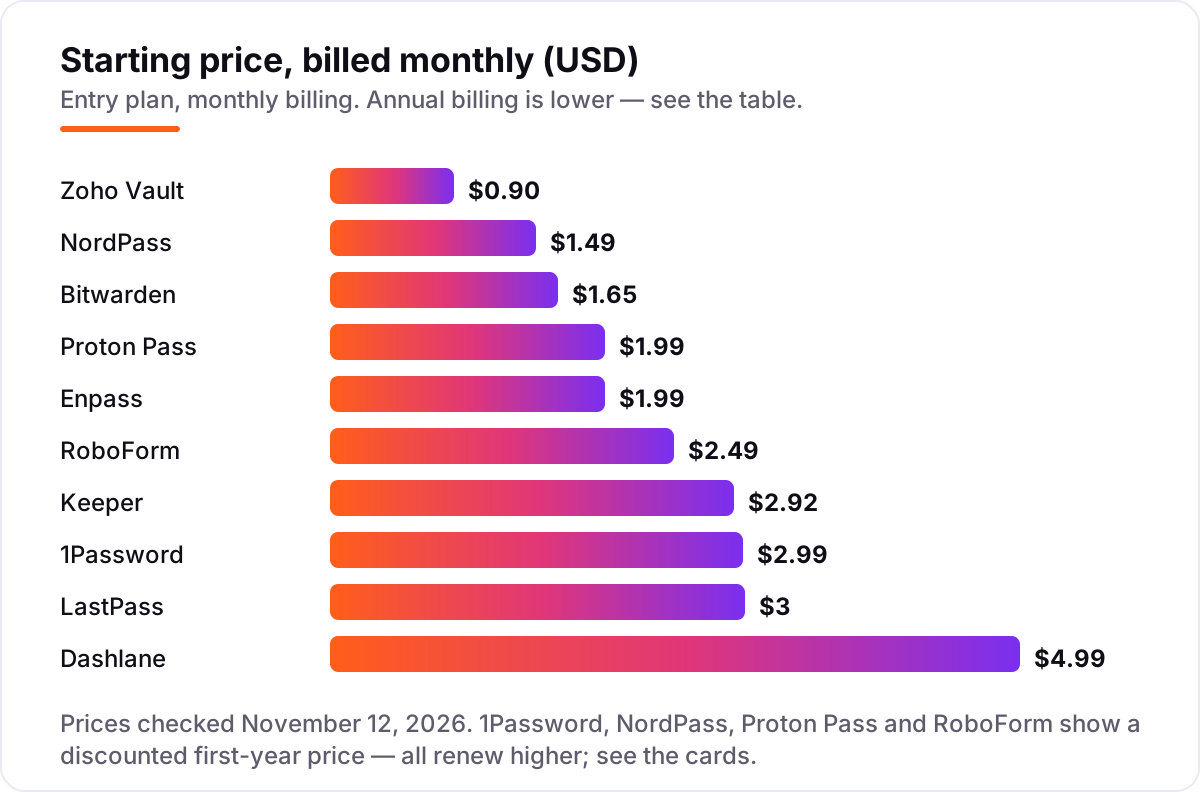
Cross-platform password manager pricing: what you will actually pay
Take one person buying for a year. On list prices, the first year costs $19.80 on Bitwarden Premium, $23.99 on Enpass Individual, $23.88 on Proton Pass Plus, $19.90 on RoboForm Premium, $34.99 on Keeper Personal, $35.88 on 1Password Individual, $36 on LastPass Premium, $59.88 on Dashlane Premium and $10.80 on Zoho Vault Standard. NordPass Premium on the 2-year plan costs $35.76 for two years, or $17.88 a year. In the renewal year, the same person pays $19.80 on Bitwarden, $23.99 on Enpass, $35.88 on Proton Pass, $29.88 on RoboForm, $34.99 on Keeper, $47.88 on 1Password, $36 on LastPass and $59.88 on Dashlane — NordPass publishes no renewal figure, so its second term is the one unknown in the list.
A family of six pays $47.88 a year on Bitwarden Families, $47.99 on Enpass Family, $48 on LastPass Families, $53.88 on 1Password Families in year one and $71.88 after that, $74.99 on Keeper Family, $89.88 on Dashlane Friends & Family, $33.48 on Proton Pass Family in year one and $59.88 after that, and $31.95 on RoboForm Family in year one and $47.75 after that. NordPass Family on the 2-year plan costs $66.96 for two years. Zoho Vault has no family plan, so a household of six pays six Standard seats at $64.80 a year.
A five-person team pays $54 a year on Zoho Vault Standard, $120 on Keeper Business Starter, $215.40 on NordPass Business on the 2-year plan, $240 on Bitwarden Teams, $479.40 on 1Password Business and $480 on Dashlane Business. The per-seat price is the number that decides the team bill: $0.90 a user a month on Zoho Vault against $7.99 on 1Password Business and $8 on Dashlane Business, before any add-ons.
Know the difference: a password manager, a browser vault and a passkey
The confusion in this category is what a password manager actually replaces. A browser vault — Chrome's, Safari's, Edge's — stores passwords inside one browser, on one ecosystem. It works until the household mixes devices: Chrome's vault does not follow you to Safari, and it cannot share a login with a partner or a colleague, run a breach check across the vault, or hold a passkey for a site that asks for one. A dedicated manager keeps one encrypted vault that syncs across every browser and device, and it adds the three things a browser vault never does: breach monitoring, secure sharing and emergency access.
A passkey is a different thing again: a cryptographic key pair that replaces the password on sites that support it, so there is nothing to type and nothing to phish. All 10 tools in this list store and autofill passkeys alongside passwords, and the vault is the natural home for them — one place holds both, and the same sync, sharing and recovery rules apply. The practical rule is simple: use the browser vault for nothing you would miss, use a dedicated manager for everything else, and save passkeys in the same manager as the passwords.
There is a second, quieter confusion: a free plan is not a free vault for the whole household. Bitwarden free covers unlimited devices, but LastPass free covers one device type, RoboForm free covers one device, and Enpass free caps at 25 items. Budget on the household's devices and items, not on the $0 headline.
Quick comparison: tool type by need
| Buyer | Best pick | Why |
|---|---|---|
| One person who wants to pay nothing | Bitwarden | Free plan with unlimited devices, Premium is $19.80/year |
| Household that wants one bill for everyone | Bitwarden Families | Six people for $47.88/year, the joint-cheapest family plan |
| Small team on a tight budget | Zoho Vault | Standard is $0.90/user/month, with a free plan |
| Business that needs compliance reports | Keeper | SOC 2, ISO 27001 and FedRAMP, Business Starter $2/user/month |
| Privacy-first buyer | Proton Pass | Swiss jurisdiction, free plan, Plus $1.99/month first year |
| Someone who fills long forms all day | RoboForm | Best form filler here, Premium $2.49/month |
Mistakes to avoid
- Budgeting on the first-year price. 1Password rises from $35.88 to $47.88 a year, Proton Pass from $23.88 to $35.88, RoboForm from $19.90 to $29.88 — and NordPass publishes no renewal figure at all, so its second term is a surprise.
- Buying for one person when the household needs a family plan. Six separate Individual plans cost $215.28 a year on 1Password; the Families plan costs $53.88 in year one. Price the household, not the person.
- Ignoring the free-plan caps. LastPass free covers one device type, RoboForm free covers one device and Enpass free stops at 25 items. A free plan that runs out mid-week forces an upgrade at the worst moment.
- Forgetting the add-ons. Keeper's BreachWatch is $19.99 a year extra and file storage another $9.99 — with both, Keeper Personal costs $64.97 a year, not $34.99. Compare the comparable total, not the headline.
- Choosing a manager with no recovery plan. Enpass has no account recovery at all, and every manager here is zero-knowledge — the vendor cannot reset a forgotten master password. Write the recovery key down and keep it somewhere safe before the vault fills up.
How we chose
We checked each vendor's own pricing page on November 12, 2026 and recorded the starting price exactly as shown, including the first-year discount and the renewal figure where the page lists one, and we ranked the tools by fit for the most common buyer — one person or household that wants the same vault on every device — not by brand size. Direct fetches of the vendor pages timed out from this machine, so the prices were verified from fresh search-index copies of the vendors' own pricing pages, each read within the last few days and cross-checked against two or more independent reads dated November 3 to 11, 2026; where two sources disagreed on a renewal figure, the card shows the vendor-page figure and the disagreement is noted. Ratings come from G2 pages checked November 12, 2026: 1Password 4.6 from 1,822 reviews, Bitwarden 4.6 from 1,415, Dashlane 4.5 from 634, NordPass 4.5 from 644 on its G2 Business listing, Keeper 4.6 from 1,197, Proton Pass 4.7 from 127 on its G2 Business listing, LastPass 4.5 from 2,080, RoboForm 4.6 from 752, Enpass 4.6 from 27 and Zoho Vault 4.4 from 78. No vendor paid for a place in this list, and none of the links here are affiliate links.
What to do next
Start with the free plan or trial of your top pick and run one real week of logins through it. Check that autofill works on the sites you actually use, that the vault syncs to a second device without a fight, and that sharing works with the people who need it. If the household is sorted but the business website is not bringing in customers, our monthly SEO service handles the visibility side. Once your tools are in place, find out what's holding your rankings back.
Frequently asked questions
What is the best cross-platform password manager?
1Password is the best fit for most people: the most polished vault, a Secret Key on top of the master password, and Watchtower breach alerts from $2.99 a month in year one. Bitwarden is the best value, with a free plan that covers unlimited devices and Premium at $19.80 a year. Dashlane is the best bundle, adding a VPN and dark-web monitoring for $4.99 a month.
How much does a cross-platform password manager cost?
Most people pay $0 to $5 a month. Seven tools here have free plans, and the first paid plans run $0.90 to $4.99 a month. A family of six typically pays $48 to $90 a year, and a five-person team pays $54 to $480 a year depending on the tool. Watch the renewal price: four tools here show a discounted first-year rate that rises after year one.
Is there a free cross-platform password manager?
Yes, with limits. Bitwarden is free with unlimited passwords on unlimited devices, Proton Pass is free with unlimited logins, and Zoho Vault is free with unlimited passwords. NordPass, LastPass, RoboForm and Enpass also have free plans, but they cap devices or items — LastPass to one device type, Enpass to 25 items, RoboForm to a single device.
What is the difference between a password manager and a browser's built-in vault?
A browser vault is tied to one browser and one ecosystem: Chrome's vault does not follow you to Safari, and it cannot share a login with a family member or a colleague. A dedicated manager syncs one encrypted vault across every browser and device, adds breach alerts, secure sharing and emergency access, and lets you export your data and leave.
Are passkeys replacing passwords, and do these tools support them?
Passkeys are spreading, but passwords are not going away yet — most sites still ask for one. All 10 tools in this list store and autofill passkeys alongside passwords, so the vault stays useful either way. The practical move is to save passkeys in the same manager as your passwords, so one vault holds both.
Can I switch password managers later?
Yes, and it is easier than most people expect. Export the vault from the old manager as a CSV, import it into the new one, and check that the logins, passkeys and secure notes all arrived before deleting anything. Keep the old vault open until the new one is proven, because a failed import in the middle of a move is how logins get lost.
What should I check before paying for a password manager?
Check the renewal price, not just the first-year price — four tools here rise after year one. Check the device and item limits on the free plan, whether breach monitoring is included or an add-on, and how many people the family plan covers. Then run the trial with real logins: save, autofill and share one password on every device before paying.
Sources we checked (20)
- 1Password pricing — 1password.com/pricing (checked November 12, 2026)
- 1Password on G2 — 4.6/5, 1,822 reviews (checked November 12, 2026)
- Bitwarden pricing — bitwarden.com/pricing (checked November 12, 2026)
- Bitwarden on G2 — 4.6/5, 1,415 reviews (checked November 12, 2026)
- Dashlane pricing — dashlane.com/pricing (checked November 12, 2026)
- Dashlane on G2 — 4.5/5, 634 reviews (checked November 12, 2026)
- NordPass pricing — nordpass.com/pricing (checked November 12, 2026)
- NordPass on G2 — 4.5/5, 644 reviews (checked November 12, 2026)
- Keeper pricing — keepersecurity.com/pricing (checked November 12, 2026)
- Keeper on G2 — 4.6/5, 1,197 reviews (checked November 12, 2026)
- Proton Pass pricing — proton.me/pass/pricing (checked November 12, 2026)
- Proton Pass on G2 — 4.7/5, 127 reviews (checked November 12, 2026)
- LastPass pricing — lastpass.com/pricing/lastpass-premium-vs-free (checked November 12, 2026)
- LastPass on G2 — 4.5/5, 2,080 reviews (checked November 12, 2026)
- RoboForm pricing — roboform.com/pricing-personal (checked November 12, 2026)
- RoboForm on G2 — 4.6/5, 752 reviews (checked November 12, 2026)
- Enpass pricing — enpass.io/pricing (checked November 12, 2026)
- Enpass on G2 — 4.6/5, 27 reviews (checked November 12, 2026)
- Zoho Vault pricing — zoho.com/vault/pricing (checked November 12, 2026)
- Zoho Vault on G2 — 4.4/5, 78 reviews (checked November 12, 2026)
Make one of these tools?
We re-check this list every quarter. Send a correction, request a review, or ask about a clearly labeled sponsored spot.
Request a listingShamim
Founder of SerpAstra
A full-stack SEO and digital marketer who spends most days on Local SEO for dental practices, AI search visibility and lead generation.
Free SEO and AI visibility audit
Find out what is holding your rankings back
Send us your site. Within 2 business days you get a written audit, an AI visibility check and a short fix list ranked by impact. Free, with no contract attached.
Request my free audit→Related buying guides
 IT Security12 Best Security Software for Small Business in 2026, ComparedCompare the 12 best security software for small business options on price, endpoint protection and passwords, with prices checked November 7, 2026.Read guide →
 IT Security9 Best Network Security Software for Small Business in 2026, ComparedCompare the 9 best network security software for small business options on price, free plans and firewalls, with every price checked November 7, 2026.Read guide →
 IT Security8 Best Small Business Computer Security Software in 2026, ComparedCompare the 8 best small business computer security software options on price, trials and ransomware protection, with every price checked November 7, 2026.Read guide →