
12 Best Construction CRM Software in 2026, Compared
Compare the 12 best construction crm software options for builders and remodelers on price, free plans and fit, with every price checked November 12, 2026.
 Shamim Mia, Founder, SerpAstraLast verified November 12, 202615 min read
We compare pricing pages, documentation and public reviews. We never accept payment for rankings.

Key takeaways
- Buildertrend is the best fit for most residential builders, but it is quote-only; the cheapest published starting prices are Contractor Foreman at $49/month and Zoho CRM and Pipedrive at $14/user/month.
- Four of the twelve tools publish no price at all — Procore, Buildertrend, JobNimbus and AccuLynx are all custom quote, so budget for a sales call, not a web page.
- The single most important buying factor is how the price grows with your team: per-seat tools charge for every hire, flat tools like Buildertrend and Buildxact do not.
- Houzz Pro and Buildxact both offer free plans, and HubSpot and Zoho CRM are free for two and three users — start free before you pay for a seat.
On this page
Quick comparison
| Tool | Best for | Starting price | Free plan |
|---|---|---|---|
| Buildertrend | Residential builders and remodelers who want one system for leads, estimates, schedules and the homeowner portal | Custom quote | No (demo only) |
| Houzz Pro | Design-build firms and remodelers who want the CRM, 3D plans and a Houzz profile in one subscription | $99/mo | Yes (free plan) |
| Contractor Foreman | Small contractors on a tight budget who want the most software per dollar in one flat-priced box | $49/mo | No (30-day trial) |
| JobNimbus | Roofing and exterior contractors who want a production board that follows how a roofing job actually moves | Custom quote | No (14-day trial) |
| AccuLynx | Insurance-restoration roofing shops at five crews and up that run supplement-heavy jobs | Custom quote | No (demo only) |
| Procore | Commercial general contractors running complex, multi-trade builds with many stakeholders | Custom quote | No (demo only) |
| JobTread | Remodelers and custom-home builders who live and die by estimate-to-actual job costing | $199/mo | No (no free trial) |
| Buildxact | Residential builders and remodelers who estimate from plans and want live dealer pricing in the quote | $199/mo | Yes (free Go plan) |
| HubSpot Sales Hub | Construction firms whose sales team already lives in HubSpot or wants AI agents on the cheapest paid seat | $20/seat/mo | Yes (free, 2 users) |
| Zoho CRM | Small construction firms that want the most CRM capability per dollar and a free plan for the first three users | $14/user/mo | Yes (free, 3 users) |
| Pipedrive | Deal-led sales teams who want the cleanest visual pipeline and near-zero adoption friction | $14/user/mo | No (14-day trial) |
| Salesforce Sales Cloud | Larger construction firms that need deep customization, a huge app ecosystem and enterprise-grade controls | $25/user/mo | No (30-day trial) |
Make one of these tools?
We re-check this list every quarter. Send a correction, request a review, or ask about a clearly labeled sponsored spot.
Request a listingThe best construction crm software

Buildertrend
Best for: Residential builders and remodelers who want one system for leads, estimates, schedules and the homeowner portal
Buildertrend is the name most residential builders hear first, and it earns the reputation by covering the whole job in one subscription: leads, estimates, proposals, Gantt scheduling, subcontractor management, change orders, daily logs, selections, warranty tracking and payments. The client portal is the part homeowners actually use — they approve selections, sign change orders and pay invoices without a phone call, which cuts the back-and-forth that eats a remodeler's week.
The catch is the price, and you cannot budget it from a web page. Buildertrend stopped publishing prices in 2025 and now quotes on annual construction volume, so get the quote early and in writing. Third-party reports put the last published Essential tier at $499 a month, and renewal increases of 50–75% are reported by long-term users — ask what the second year costs before you sign the first.
What we like
- The residential default: estimating, scheduling, change orders, selections, warranty and payments in one subscription
- A client portal homeowners actually use, cutting the back-and-forth on selections and change orders
- Unlimited users and unlimited projects on every tier — no per-seat math as the team grows
- Absorbed CoConstruct in 2021, so the residential market's two biggest names are now one company
Watch out for
- No published price — every quote comes from a sales call, so budgeting starts with a demo
- Renewal increases of 50–75% are reported by long-term users, with no notice in some cases
- Onboarding takes about two months on average, and the interface feels dated to some users

Houzz Pro
Best for: Design-build firms and remodelers who want the CRM, 3D plans and a Houzz profile in one subscription
Houzz Pro is the only tool here that sells the CRM and the lead source together. The subscription buys business software — estimates, proposals, invoicing, payments, a CRM and 3D floor plans — plus a profile on Houzz, where homeowners browse projects and find pros. Design costs $99 a month for one user and covers the design-led workflow: 3D plans, mood boards, selections, the product clipper and the CRM.
The pricing trap is the per-user charge. Design and Pro each include one user, and every extra person costs $50 a month, so a five-person team on Design pays $299 a month. Contracts, takeoffs and schedules wait for Pro at $199 a month; the advertising package is a separate $499 a month. Buy Houzz Pro when the Houzz profile itself is worth paying for; the general CRMs below are cheaper otherwise.
What we like
- The only tool here that pairs the CRM with a Houzz profile where homeowners actually search for pros
- Design at $99 a month includes 3D floor plans, mood boards, selections, a CRM, estimates and online payments
- A real free plan covers the 3D floor planner, estimates and invoicing at $0
- Teams from $399 a month adds unlimited users, AI note-taking, email marketing and a custom website
Watch out for
- Design and Pro each cover one user — every extra person costs $50 a month until Teams at $399
- Contracts, takeoffs and schedules wait for Pro at $199 a month, not the $99 Design plan
- The advertising package is a separate $499 a month on top of any software plan

Contractor Foreman
Best for: Small contractors on a tight budget who want the most software per dollar in one flat-priced box
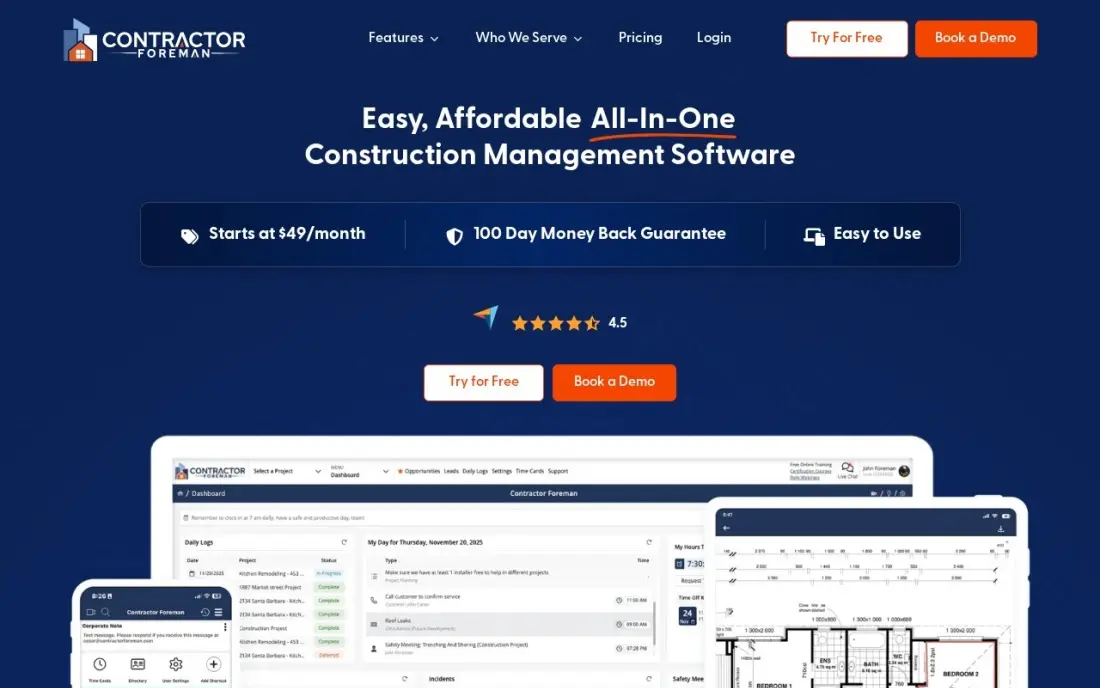
Contractor Foreman packs the most software into the lowest price in this list. Five tiers are priced by how many users they include: Basic is $49 a month for one user, Standard is $105 for up to three, Plus is $166 for up to eight, Pro is $221 for up to fifteen, and Unlimited is $332 with no user cap, all on annual billing. Every tier has a 30-day free trial; annual plans carry a 100-day money-back guarantee.
Read the headline price carefully. Basic at $49 covers one user and leaves out daily logs, change orders, time cards, the client portal and QuickBooks — most features contractors compare on start at Plus, $166 a month. Basic is annual-only, so the cheapest way in still costs $588 up front. Pick it when budget matters most and a flat price beats polish.
What we like
- Cheapest full platform here: Basic is $49 a month billed annually for estimates, bids, invoices and scheduling
- Flat per-tier pricing by user count, not per seat, so adding a foreman does not reprice the whole account
- 30-day free trial and a 100-day money-back guarantee on annual plans — the longest in this list
- Unlimited plan at $332 a month covers unlimited users and every feature, including a dedicated success manager
Watch out for
- Basic at $49 covers one user and strips out daily logs, change orders, time cards, the client portal and QuickBooks
- Plans are capped by user count, so a growing crew climbs the ladder from $49 to $332
- No free plan and a busy interface that takes time to learn

JobNimbus
Best for: Roofing and exterior contractors who want a production board that follows how a roofing job actually moves
JobNimbus is a roofing CRM first and a job tracker second, and the board shows it: jobs move across a production board that matches how a roofing crew actually works, with documents, billing and communication attached to each job. Four tiers cap users — Essentials up to 3, Pro up to 10, Premium up to 19, Enterprise for 20 and above — so a small shop scales in small steps.
The frustration is the pricing page, which lists the tiers and their user caps but no dollar amounts. Third-party reports put the base at about $225 to $550 a month plus $20 to $75 per user by role, and texting adds $49 to $249 a month. Get the quote in writing at your real user count, with the texting add-on itemized, before comparing it with anything that publishes a price.
What we like
- Built for roofing from the ground up: boards, production tracking, documents and billing around shared jobs
- Four tiers by user cap (Essentials up to 3 users, Pro up to 10, Premium up to 19, Enterprise 20+) scale in small steps
- Owns SumoQuote, so proposals and estimates sit inside the same workflow as the job board
- Strong mobile app, rated 4.8 stars from about 13,000 App Store ratings
Watch out for
- No dollar amounts on the pricing page — every tier says 'Request pricing' and needs a sales call
- Per-user fees stack on a base fee, so the bill climbs with every hire and every add-on
- Texting (Engage) is a separate $49–$249 a month on top of the base plan

AccuLynx
Best for: Insurance-restoration roofing shops at five crews and up that run supplement-heavy jobs
AccuLynx is the oldest roofing-only CRM, founded in 2008 and built for the insurance-restoration workflow: supplements, aerial measurements, ordering and production controls in one place. It is the deeper production suite of the two roofing tools here — the one larger shops graduate to when JobNimbus starts to feel light — with support and reporting scores on G2 that lead the roofing tools here.
It is also the most opaque on price. In 2026 AccuLynx removed its last public plan, leaving Pro and Elite as quote-only, and third-party reports put the per-user model at roughly $55 to $85 a user, so a small team starts near $350 to $450 a month before add-ons and a mid-size crew commonly runs $1,000 or more. Buy it when restoration volume justifies the cost; smaller shops get further on the published prices below.
What we like
- The most established roofing production CRM, built for insurance restoration from day one
- Deepest production controls here: supplement tracking, ordering, aerial measurements and reporting in one place
- Strong support and reporting scores on G2, the highest of the roofing tools in this list
- EagleView ordering and a wide integration set cover the restoration workflow end to end
Watch out for
- No published pricing at all — in 2026 it removed its last public plan, leaving Pro and Elite quote-only
- Per-user model at roughly $55–$85 per user, so a mid-size crew commonly runs $1,000 or more a month
- Texting, SmartDocs, the customer portal and integrations stack on top of the per-seat base

Procore
Best for: Commercial general contractors running complex, multi-trade builds with many stakeholders
Procore is not really a CRM you buy for the sales pipeline — it is the whole-company platform for a commercial general contractor, and the CRM and pipeline intelligence sit inside its preconstruction and bid management suite. Project management, financials, field tools, quality and safety, BIM and bidding live in one system, and in February 2026 Procore added bundled packages to simplify buying.
Pricing is the opposite of the per-seat tools below: Procore typically charges no per-user fee, pricing on the products selected and annual construction volume, with unlimited users. That makes it cheap per head for a big firm and expensive for a small one — third-party estimates put small GC entry near $15,000 to $30,000 a year. Buy Procore when the company runs complex commercial builds; a residential builder gets further on Buildertrend or Houzz Pro.
What we like
- The enterprise default: project management, financials, field tools, BIM and preconstruction in one platform
- No per-seat fees — pricing is by products selected and annual construction volume, with unlimited users
- Bundled packages (Project Execution, Cost Management, Resource Management) added in February 2026 simplify buying
- Highest-rated tool here on G2 at 4.6/5 from more than 4,200 reviews
Watch out for
- No published price — quotes are sized to annual construction volume, and third-party estimates put small GC entry around $15,000–$30,000 a year
- Implementation is a real project: expect weeks of setup and training before the team is fluent
- The depth that makes it powerful also makes it heavy — small firms pay for capability they never use

JobTread
Best for: Remodelers and custom-home builders who live and die by estimate-to-actual job costing
JobTread is the youngest tool here and the most single-minded: one plan, every feature included, at $199 a month for the account plus $20 a month per internal user, with the first user included. The differentiator is job costing: estimates link to budgets, purchase orders, invoices and daily logs, so the number that wins the job becomes the number you track, and the gap between estimate and actual is visible on every job.
The model changed in 2026 from a flat rate to base-plus-per-user, and the math matters: a four-person office pays $259 a month, and anyone who tracks time counts as an internal user. Annual billing cuts the base to $159 a month and extra users to $16. There is no free trial, so book the demo and test the job-costing reports before the 30-day money-back window closes.
What we like
- The cleanest pricing here: one plan, every feature included, $199 a month plus $20 per internal user
- Estimates link to budgets, purchase orders, invoices and job costing, so the number that wins the job becomes the number you track
- Per-user rates step down after 10 users ($15, then $10, then $5), so growth gets cheaper per seat
- Highest-rated tool in this list on G2 at 5.0/5, with customer support the top reviewer-cited strength
Watch out for
- No free trial — you book a demo, and the 30-day money-back guarantee covers monthly plans only
- The $199 base fee is heavy for a solo operator: one person pays the same base as a nine-seat office
- Anyone who tracks time counts as an internal user, so field staff add $20 a month each

Buildxact
Best for: Residential builders and remodelers who estimate from plans and want live dealer pricing in the quote
Buildxact is an estimating-first platform for residential builders and remodelers, and the estimate is where it earns its place. Digital takeoff runs from uploaded plans, live dealer material pricing feeds the quote, and the estimate that wins the job becomes the cost baseline during construction, with estimate-to-actual costing connecting committed and actual costs in one workflow. Foundation is $199 a month, or $169 billed annually, with unlimited users on every plan.
The limits are scope, not price. Foundation is estimating-heavy — job management and scheduling wait for Pro at $399 a month, and the Blu AI tools cost $99 to $149 a month as add-ons on lower plans, included only on Master at $599. A free Go plan gives five AI estimating credits to test before paying. Choose Buildxact when estimating is the main job; JobTread when job costing is.
What we like
- Digital takeoff runs from uploaded plans, and live dealer material pricing feeds the quote
- The winning estimate becomes the cost baseline, with estimate-to-actual costing in one workflow
- Every plan includes unlimited users, so the crew can grow without repricing the account
- Free Go plan gives five complimentary AI estimating credits to test the style before paying
Watch out for
- Job management and scheduling wait for Pro at $399 a month — Foundation is estimating-heavy
- AI tools (Blu) are add-ons at $99–$149 a month on lower plans, included only on Master
- Monthly plans reportedly carry a 12-month initial contract, so confirm before signing

HubSpot Sales Hub
Best for: Construction firms whose sales team already lives in HubSpot or wants AI agents on the cheapest paid seat

HubSpot Sales Hub is the general CRM closest to a construction tool, because the cheapest paid seat now carries AI agents: the Prospecting agent, Notetaker and Agent Builder all sit on Starter, with 500 HubSpot Credits a month. Starter is $20 a seat a month standard, with a $7 a seat annual promotion for new customers, and the free plan covers up to two users at $0.
The catch is the ladder: Starter buys a simple pipeline with two deal pipelines and basic reporting, and forecasting waits for Professional at $90 a seat a month plus a required $1,500 onboarding fee. HubSpot is not construction-specific — no estimating, scheduling or job costing — so it pairs with a project tool rather than replacing one. Pick it when the team already lives in HubSpot or wants AI on the cheapest seat.
What we like
- AI agents start on the cheapest paid seat: Prospecting agent, Notetaker and Agent Builder on Starter
- Free plan covers up to 2 users, so a two-person office can run the CRM at $0
- View-only seats are free on every tier, so the office can watch the pipeline without paying
- The largest integration marketplace of any general CRM here, with 500 HubSpot Credits a month on Starter
Watch out for
- The $7 annual price is a new-customer promotion — the standard Starter rate is $20 a seat a month
- Costs escalate fast past Starter: Professional is $90 a seat a month plus a required $1,500 onboarding fee
- Advanced features are gated by tier, so the cheap seat buys a simple pipeline, not forecasting

Zoho CRM
Best for: Small construction firms that want the most CRM capability per dollar and a free plan for the first three users
Zoho CRM wins on paper: the cheapest paid seat at $14 a user a month on Standard, a free plan for the first three users, plus workflow automation, custom modules and email integration on entry — capability costing $90-plus a seat elsewhere. The Zoho ecosystem is the other reason to pick it: Books, Inventory, Projects and Desk connect without third-party tools, so the CRM grows into the back office.
The trade is polish: a cluttered interface and long setup are the most common G2 complaints, Zia — the AI sales assistant — is gated behind Enterprise at $40 a user a month, and support responsiveness is inconsistent. None of that changes the value math: three users pay $0, five pay $70 a month on Standard. Choose it when the budget matters most and the team will tolerate the learning curve.
What we like
- Cheapest paid seat here at $14 a user a month, with a free plan for the first three users
- Workflow automation, custom modules and email integration on Standard — capability that costs $90-plus elsewhere
- Deep Zoho ecosystem: Books, Inventory, Projects and Desk connect without third-party tools
- Free for three users means a small office can run the CRM at $0 until the fourth hire
Watch out for
- Zia, the AI sales assistant, is gated behind Enterprise at $40 a user a month
- A cluttered interface and long setup are the most common complaints in G2 reviews
- Support responsiveness is inconsistent, and some low-star reviews cite unresolved tickets

Pipedrive
Best for: Deal-led sales teams who want the cleanest visual pipeline and near-zero adoption friction
Pipedrive does one thing better than anything else here: the sales pipeline. The drag-and-drop kanban board is why reps actually use it from day one, and the setup is the simplest in this list — ease of setup scores 8.7 on G2. Lite costs $14 a user a month billed annually, the same entry as Zoho CRM, with a 14-day free trial and no free plan.
The catch is what Lite leaves out: no email automation, group emailing or caller on the entry tier, and the Nova AI assistant starts on Growth at $39 a user a month, so most teams move up within weeks. Add-on stacking is the top user complaint, cited in 230 G2 reviews. Pick Pipedrive when the pipeline itself is the job and the team wants the shortest path from signup to selling.
What we like
- The best visual pipeline in this list: drag-and-drop kanban that reps actually use from day one
- Same $14 entry as Zoho CRM with a far simpler setup — ease of setup scores 8.7 on G2
- LeadBooster and a wide add-on set let a small team grow without switching CRMs
- Rated 4.3/5 on G2 from more than 5,100 reviews, with ease of use the top reviewer-cited strength
Watch out for
- No email automation, group emailing or caller on Lite — most teams move to Growth at $39 within weeks
- AI assistant Nova is included only from Growth upward, not on the $14 Lite plan
- Add-on stacking is the top user complaint, cited in 230 G2 reviews

Salesforce Sales Cloud
Best for: Larger construction firms that need deep customization, a huge app ecosystem and enterprise-grade controls
Salesforce Sales Cloud is the reference point everything else is measured against: the deepest customization, the largest app ecosystem and the longest track record. Starter Suite costs $25 a user a month and covers leads, accounts, contacts, opportunities and email sync, genuinely enough for a small team — and the only edition you can pay month to month.
The honest cost is not the license, it is the implementation. Pro Suite at $100 a user a month and above are annual-only, API access is a separate $25 a user a month, and most serious rollouts involve a consulting partner whose services bill can exceed the first year's licenses. Buy Salesforce when the firm is large enough to need its depth and to staff it; a five-person office gets further on Zoho CRM or Pipedrive at $14 a seat.
What we like
- The reference point everything else is measured against: the deepest customization and the largest app ecosystem
- Starter Suite at $25 a user a month covers leads, accounts, contacts, opportunities and email sync
- Free Suite at $0 gives a small team a working CRM before any license is bought
- Slack is included at no extra cost on Starter Suite, and every edition carries a 30-day free trial
Watch out for
- Only Starter Suite can be billed monthly — Pro Suite at $100 and above lock you into annual contracts
- Implementation usually needs a consulting partner, and that services bill can exceed the first year's licenses
- API access is a paid line at $25 a user a month on top of the license
The best construction crm software for a builder is not the one with the longest feature list — it is the one that fits how the firm actually sells work. Some tools here are construction platforms that carry a CRM inside them, and some are general CRMs that construction firms adopt for the sales side. We ranked the twelve below by fit for the most common buyer — a residential builder or remodeler with a small office — starting with the all-in-ones and ending with the general CRMs, and every price was checked on November 12, 2026.
How to choose the best construction crm software
- Start with how you sell, not how you build. If the sale is a bid, a proposal and a signed contract, you need pipeline tracking and follow-up reminders. If the sale is a homeowner walking through selections, you need a client portal.
- Count the seats before you compare prices. Per-seat tools charge for every hire, and JobTread counts anyone who tracks time. Flat tools like Buildertrend and Buildxact do not charge per user at all.
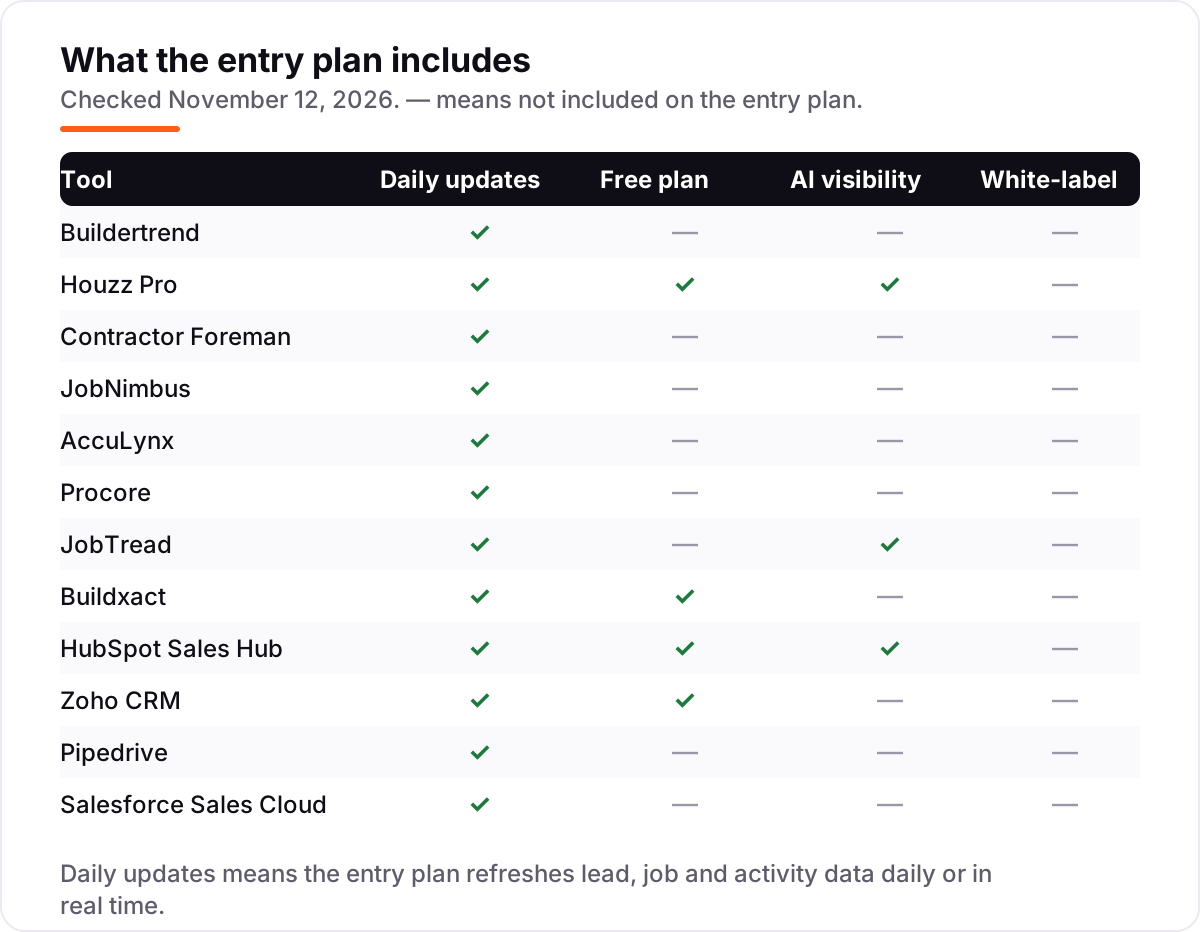
- Check what the entry tier actually includes. Contractor Foreman Basic leaves out daily logs and QuickBooks, Houzz Pro Design leaves out contracts, and Pipedrive Lite leaves out email automation.
- Ask whether the CRM runs the job too. Buildertrend, Procore, JobTread and Buildxact carry scheduling and job costing inside the same subscription; HubSpot, Zoho CRM, Pipedrive and Salesforce do not.
- Budget for the quote-only tools separately. Procore, Buildertrend, JobNimbus and AccuLynx publish no price, so the only honest number is the one sales gives you in writing.
A CRM is one system in the stack, not the whole stack. If the firm also needs to be found online by homeowners searching for a builder, our local SEO service handles the visibility side. And before you publish new pages for the services you sell, run your titles through the free SERP snippet preview tool — it shows exactly how the title and description will look in Google.
Whatever you shortlist, try it with real jobs before you pay. The free plans and trials in this list are long enough to run one genuine month — your leads, your estimates, your follow-ups — and that month tells you more than any review can. Check two things in the trial: that the pipeline actually matches how your team sells, and that the estimate that wins the job flows into the job costing without retyping. Every tool here is sold in 2026 and actively supported, so there is no reason to buy before your own jobs have run through it.
Construction CRM software pricing: what you will actually pay
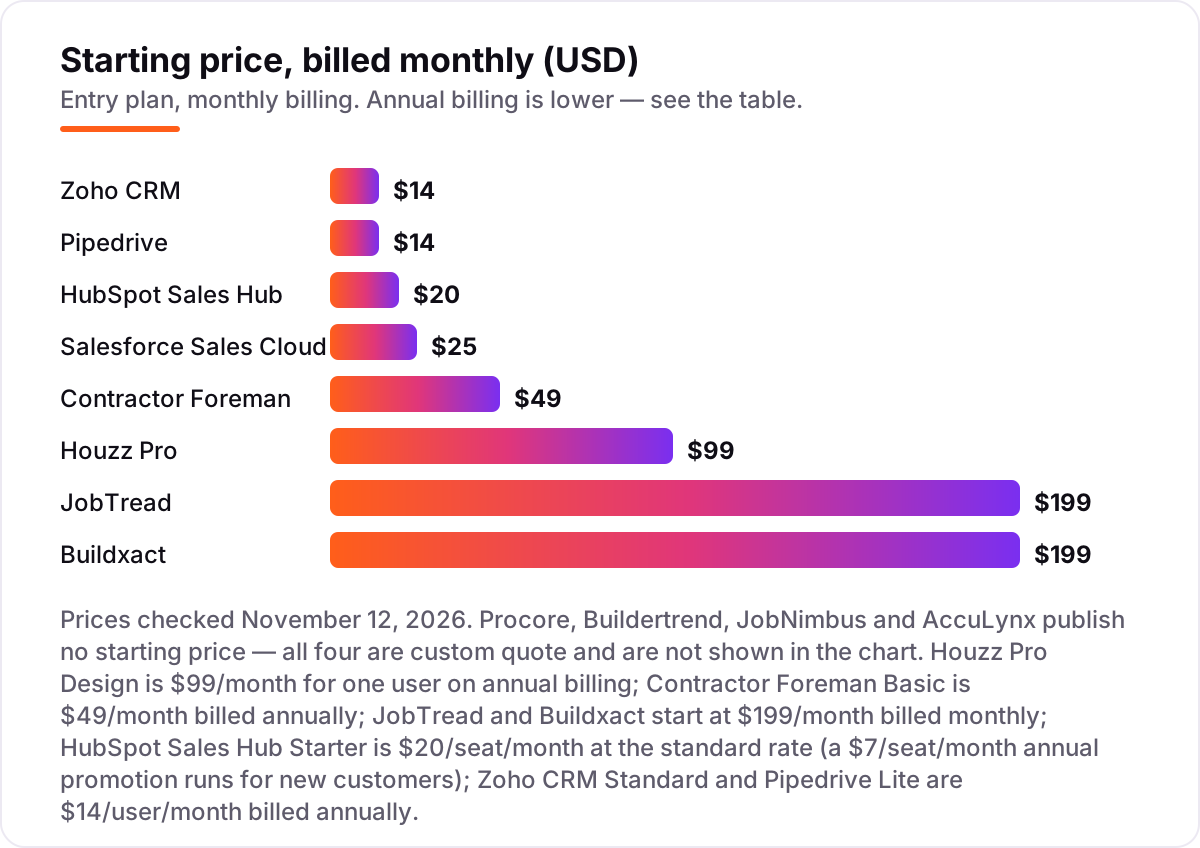
Take a five-person remodeling office — owner, project manager, salesperson, bookkeeper and foreman. On list prices, the CRM costs $70 a month on Zoho CRM Standard or Pipedrive Lite, $100 on HubSpot Sales Hub Starter at the standard rate, $125 on Salesforce Starter Suite, $166 on Contractor Foreman Plus, $199 on Buildxact Foundation or JobTread's base, and $299 on Houzz Pro Design once the four extra seats at $50 each are added. JobTread's number needs the per-user math: $199 for the account plus $20 for each of the four extra internal users beyond the first, which comes to $279 a month — the $199 is the base, not the bill.
Over a year, that is $840 on Zoho CRM or Pipedrive, $1,200 on HubSpot at the standard rate, $1,500 on Salesforce, $1,992 on Contractor Foreman Plus, $2,028 on Buildxact Foundation billed annually, $2,676 on JobTread billed annually, $3,348 on JobTread billed monthly, and $3,588 on Houzz Pro Design. Annual billing is the cheapest lever in this list: Zoho CRM drops from $1,200 to $840 a year, Buildxact from $2,388 to $2,028, and JobTread from $3,348 to $2,676. HubSpot's $7 promotion would cut its year to $420, but it is a new-customer rate — budget on the $20 standard price, not the promo.
Three costs sit outside every number above. First, the quote-only tools: Buildertrend's last published Essential tier was $499 a month, and third-party estimates put small GC entry on Procore around $15,000 to $30,000 a year — get both quotes in writing before you compare them with anything that publishes a price. Second, the add-ons: JobNimbus texting runs $49 to $249 a month, AccuLynx texting and SmartDocs stack on top of the per-seat base, and Buildxact's Blu AI tools are $99 to $149 a month each on lower plans. Third, implementation: Buildertrend averages about two months to implement, and Procore rollouts usually need a consulting partner.
Know the difference: construction CRM vs construction management software
The confusion in this category is between selling the job and running the job. A CRM tracks the sale: leads, follow-ups, estimates and the pipeline up to the signed contract. Construction management software runs the job after that: schedules, daily logs, change orders, purchase orders and job costing. The two jobs meet at the signed estimate, and that handoff is where most firms lose money — retyping the estimate into a second system, or losing the change order between the office and the field.
The tools in this list split three ways. The all-in-ones — Buildertrend, Procore, JobTread, Buildxact, Houzz Pro and Contractor Foreman — do both jobs in one subscription, so the estimate that wins the work becomes the budget you track. The roofing pair — JobNimbus and AccuLynx — do the sale and the production board for roofing specifically, with supplement tracking that general tools never offer. And the general CRMs — HubSpot, Zoho CRM, Pipedrive and Salesforce — do the sales side well and cheaply, but need a project tool alongside them.
A second, quieter confusion is the per-seat trap. A tool can look cheap at $14 a user and still be the wrong buy: five users on Zoho CRM cost $70 a month, but five users on Houzz Pro Design cost $299, and a growing crew on AccuLynx at $70 a user costs $1,050 a month for fifteen people. Flat-priced tools — Buildertrend, Buildxact and Contractor Foreman's Unlimited tier — do not charge for headcount at all, which is why the price model matters more than the headline number.
Quick comparison: tool type by need
| Buyer | Best pick | Why |
|---|---|---|
| Residential builder or remodeler | Buildertrend | One system from lead to warranty, unlimited users, custom quote |
| Design-build firm that wants leads | Houzz Pro | CRM plus 3D plans plus a Houzz profile, from $99/month |
| Small contractor on a budget | Contractor Foreman | Full all-in-one from $49/month, flat priced by tier |
| Roofing contractor | JobNimbus | Board built for roofing jobs, custom quote |
| Insurance-restoration roofing shop | AccuLynx | Deepest production and supplement controls, custom quote |
| Commercial general contractor | Procore | Whole-company platform, no per-seat fees, custom quote |
| Remodeler who lives on job costing | JobTread | One plan, every feature, $199/month plus $20 per user |
| Builder who estimates from plans | Buildxact | Takeoff to live dealer pricing, $199/month, unlimited users |
| Team that wants AI on the cheap seat | HubSpot Sales Hub | Agents on Starter, $20/seat/month standard rate |
| Best value general CRM | Zoho CRM | Free for 3 users, Standard $14/user/month |
| Cleanest sales pipeline | Pipedrive | Drag-and-drop kanban, Lite $14/user/month |
| Large firm needing deep customization | Salesforce Sales Cloud | Deepest CRM here, Starter Suite $25/user/month |
Mistakes to avoid
- Budgeting on the promo price. HubSpot's $7 a seat is a new-customer promotion; the standard Starter rate is $20. The list price is what you pay in year two, so compare tools on that number.
- Counting only the office staff. JobTread charges $20 a month for anyone who tracks time, so field staff count as paid users. Houzz Pro charges $50 a month for every extra person past the first. Count the whole crew, not just the office.
- Buying the cheapest tier, then finding the feature costs extra. Contractor Foreman Basic leaves out daily logs and QuickBooks, Houzz Pro Design leaves out contracts, and Pipedrive Lite leaves out email automation. The tier that has your must-have feature is your real starting price.
- Comparing quote-only tools on a sticker price. Procore, Buildertrend, JobNimbus and AccuLynx publish no price, and third-party ranges disagree by thousands of dollars a year. Get each quote in writing at your real user count before you rank them.
- Signing an annual plan before the trial. JobTread offers no free trial at all, and Contractor Foreman Basic is annual-only. Run a real month of jobs through the trial first — or, where there is no trial, book the demo and test the job-costing reports before the money-back window closes.
How we chose
We checked each vendor's own pricing page on November 12, 2026 and recorded the starting price exactly as shown, including the annual-billing figure where the page lists one. The vendor's own pages were read through fresh search-index copies of the pricing pages plus independent October and November 2026 reads, because the live page fetch was unavailable on the day — four tools publish no price at all, so they are listed as custom quote with the third-party ranges reported in the cards, clearly marked as reported, not vendor-verified. Ratings come from fresh G2 review pages crawled within the last few days, with score and review count shown on each card. We left CoConstruct out of this list: it is no longer sold to new customers, and new buyers are sent to Buildertrend. We ranked the tools by fit for the most common buyer — a residential builder or remodeler with a small office — not by brand size. No vendor paid for a place in this list, and none of the links here are affiliate links.
What to do next
Start with the free plan or trial of your top pick and run one real month of jobs through it. Check that the pipeline matches how your team actually sells, that the estimate flows into job costing without retyping, and that the price at your real user count matches the quote. If the tools are sorted but new customers are not finding you, our monthly SEO service handles the visibility side — or compare providers in our guide to CRM software for real estate. Software runs the business; search brings the customers. See where you rank locally, free.
Frequently asked questions
What is the best construction CRM software?
Buildertrend is the best fit for most residential builders: one system for leads, estimates, schedules and the homeowner portal, though it is quote-only. Roofers usually pick JobNimbus or AccuLynx, commercial GCs pick Procore, and small firms on a budget get the most for the money from Contractor Foreman at $49/month.
How much does construction CRM software cost?
Published starting prices run from $14/user/month (Zoho CRM and Pipedrive) to $199/month (JobTread and Buildxact), with Contractor Foreman at $49/month and Houzz Pro at $99/month in between. Four tools — Procore, Buildertrend, JobNimbus and AccuLynx — publish no price and quote by sales call.
Is there a free construction CRM?
Yes, with limits. Houzz Pro and Buildxact both offer free plans, and HubSpot is free for up to two users while Zoho CRM is free for up to three. The free plans cover basic estimating, invoicing and contact tracking; pipelines, automation and job costing sit on paid tiers.
What is the difference between a construction CRM and construction management software?
A CRM tracks the sale: leads, follow-ups, estimates and the pipeline up to the signed contract. Construction management software runs the job after that: schedules, daily logs, change orders and job costing. Tools like Buildertrend and Procore do both; pure CRMs like HubSpot, Zoho CRM and Pipedrive need a project tool alongside.
Do I need a CRM if I already use Buildertrend or Procore?
Usually not. Both tools already carry a CRM inside the platform — Buildertrend has lead management and a client portal, and Procore has CRM and pipeline intelligence in its preconstruction suite. A second CRM only makes sense if the sales team works in a different system from the project team and needs its own pipeline.
Can a general CRM like HubSpot work for a construction company?
Yes, for the sales side. HubSpot, Zoho CRM, Pipedrive and Salesforce all track leads, deals and follow-ups well, and they cost $14–$25 per user a month to start. None of them estimates, schedules or tracks job costs, so pair one with a project tool — or pick an all-in-one like Buildertrend instead.
How long does it take to set up a construction CRM?
A general CRM like Pipedrive or Zoho CRM can be running in days. Construction all-in-ones take longer: Buildertrend averages about two months to implement, and Procore needs weeks of setup and training. Plan the move for a slow period, and migrate open leads and active jobs before going live.
Sources we checked (13)
- Buildertrend pricing — buildertrend.com/pricing (checked November 12, 2026)
- Houzz Pro pricing — houzz.com/pro/pricing (checked November 12, 2026)
- Contractor Foreman pricing — contractorforeman.com/pricing (checked November 12, 2026)
- JobNimbus pricing — jobnimbus.com/pricing (checked November 12, 2026)
- AccuLynx pricing — acculynx.com/pricing (checked November 12, 2026)
- Procore pricing — procore.com/pricing (checked November 12, 2026)
- JobTread pricing — jobtread.com/pricing (checked November 12, 2026)
- Buildxact pricing — buildxact.com/pricing (checked November 12, 2026)
- HubSpot Sales Hub pricing — hubspot.com/pricing/sales (checked November 12, 2026)
- Zoho CRM pricing — zoho.com/crm/zohocrm-pricing.html (checked November 12, 2026)
- Pipedrive pricing — pipedrive.com/pricing (checked November 12, 2026)
- Salesforce Sales Cloud pricing — salesforce.com/sales/pricing (checked November 12, 2026)
- G2 reviews: Procore, Buildertrend, JobNimbus, AccuLynx, Houzz Pro, JobTread, Buildxact, Contractor Foreman, HubSpot Sales Hub, Zoho CRM, Pipedrive, Salesforce Sales Cloud (checked November 12, 2026)
Make one of these tools?
We re-check this list every quarter. Send a correction, request a review, or ask about a clearly labeled sponsored spot.
Request a listingShamim
Founder of SerpAstra
A full-stack SEO and digital marketer who spends most days on Local SEO for dental practices, AI search visibility and lead generation.
Free SEO and AI visibility audit
Find out what is holding your rankings back
Send us your site. Within 2 business days you get a written audit, an AI visibility check and a short fix list ranked by impact. Free, with no contract attached.
Request my free audit→Related buying guides
 Real Estate & Property Management8 Best CRM Software for Real Estate in 2026, ComparedCompare the 8 best CRM software for real estate options on price, free plans and IDX websites, with every price checked on November 12, 2026.Read guide →
 Construction & Field Service12 Best Construction Inventory Software Reviews in 2026, ComparedCompare the 12 best construction inventory software reviews on price, free plans, barcode tracking and QuickBooks sync, with prices checked November 7, 2026.Read guide →
 Construction & Field Service10 Best Digital Tools for Construction Management in 2026, ComparedCompare the 10 best digital tools for construction management on price, field tools, job costing and AI features, with every price checked November 7, 2026.Read guide →